

Choosing smart home automation often comes down to which assistant will connect your lights, plugs, locks, cameras, and routines with the least friction. Amazon Alexa and Google Home are the two common starting points because both can control compatible devices by voice and automate everyday tasks. Their strengths differ: Alexa offers a broad device ecosystem and many customization options, while Google Home fits naturally into homes that already use Google services and favors simpler setup and control.

Get furniture and decor delivered free with Prime
- Fast, free delivery on millions of items
- Prime Video, Amazon Music and more included
- Member-only deals all year

Echo Hub (8" Newest Model) – Redesignable Smart Home Hub with Alexa+
- ✔ Display: 8-inch touchscreen, 1280 × 800
- ✔ Smart home protocols: Wi-Fi, Bluetooth LE Mesh, Zigbee, Thread, Matter controller
- ✔ Wi-Fi: Dual-band 802.11a/b/g/n/ac
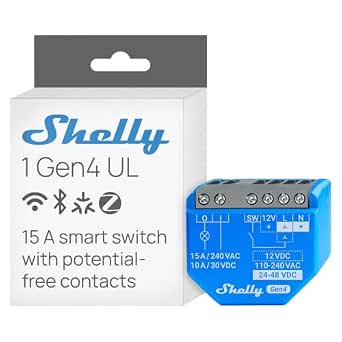
Shelly 1 Gen4 UL Smart Relay Switch with Wi-Fi, Zigbee, Matter and Dry Contact
- ✔ Channel: Single
- ✔ Output: Normally open dry contact
- ✔ Maximum current: 15 A

Shelly 1PM Mini Gen4 Smart Switch – Wi-Fi, Matter & Zigbee, 1-Channel, 8 A (2 Pack)
- ✔ Package: Two 1-channel smart switches
- ✔ Maximum current: 8 A per switch
- ✔ Stated wattage: 2000 W
The difference matters most when you add devices over time. Alexa is a stronger bet for a mixed-brand home or a household that wants detailed routines; Google Home makes more sense when members already use Android, Google Assistant, or Nest products. Neither platform guarantees that every device will work, so check compatibility before buying. The comparison below focuses on the practical tradeoffs that affect cost, daily convenience, and room to expand.
At a Glance
| Criteria | Amazon Alexa | Google Home | Winner |
|---|---|---|---|
| Device compatibility | Broad selection of compatible products across many brands; confirm support for each device and protocol. | Broad support, with particularly natural integration for Google and Nest products; check device compatibility. | A |
| Setup and everyday control | Echo devices and the Alexa app provide familiar voice and app controls; setup quality varies by product. | Google Home app and Assistant offer straightforward controls, especially for Google users. | B |
| Automation flexibility | Routines, schedules, and device-triggered actions support detailed household setups. | Supports routines and schedules, though some users may find fewer advanced choices than Alexa. | A |
| Voice assistant and services | Works with Amazon services and a wide range of third-party skills and integrations. | Fits Google services, Android, and Assistant-supported devices; third-party integrations depend on the product. | Depends |
| Security camera integration | Strong fit for Ring cameras and compatible security products; features vary by device and subscription. | Convenient with Nest cameras and doorbells; storage and advanced features may require a subscription. | Depends |
| Cost and ecosystem value | Echo hardware is available at many price points; advanced features or subscriptions can add ongoing costs. | Google and Nest devices span price points; camera features or other services may carry subscription costs. | Depends |
Echo Hub (8" Newest Model) – Redesignable Smart Home Hub with Alexa+
The Echo Hub is the most complete choice when our automation problem is coordination: we want one place to see controls, camera feeds, and routines instead of relying on a collection of individual switches. Its customizable 8-inch touchscreen makes frequently used actions visible to household members who may not want to open an app or remember voice commands. That broad control role puts it ahead of either Shelly relay for managing a mixed smart home, though it cannot directly perform the wired switching jobs those relays handle.Its strongest practical advantage is the spread of supported connections, including Zigbee, Thread, Matter, Wi-Fi, and Bluetooth, alongside Alexa-compatible devices. This can make it a useful anchor in a varied setup, but the supplied specifications describe Matter support as controller only; buyers should confirm the specific device relationships they need. Compared with the 1 Gen4 and 1PM Mini, the Echo Hub is easier to understand as a household interface, but less suited to discreet behind-the-switch automation.Plan for a fixed location and power arrangement. The hub can be wall-mounted, and PoE is possible with compatible equipment, but PoE and in-wall cable pass-through require separate accessories. It is not portable, and some Bluetooth device profiles are unsupported. For a home that needs an at-a-glance dashboard, these limits are usually easier to accommodate than they would be for someone seeking a small, hidden automation module.
Pros:
- Customizable touchscreen dashboard for device controls, camera feeds, and routines.
- Supports multiple protocols, including Zigbee, Thread, Wi-Fi, Bluetooth, and Matter controller functions.
- Can be wall-mounted, with PoE options when paired with compatible equipment.
- Includes privacy controls and uses 27% recycled materials.
Cons:
- PoE and in-wall cable pass-through need separate accessories.
- Fixed installation makes it unsuitable as a handheld or portable control panel.
- Some Bluetooth profiles and PIN-code devices are unsupported.
Best for: Households that want a shared, wall-mounted dashboard for controlling a broad mix of compatible smart devices and routines.
Not ideal for: Buyers who need a portable controller, a wired relay, or guaranteed support for a particular Bluetooth device profile.
Bottom line: Choose the Echo Hub when a visible, multi-protocol control point matters more than discreet circuit-level switching.
“Choose the Echo Hub when a visible, multi-protocol control point matters more than discreet circuit-level switching.”
Shelly 1 Gen4 UL Smart Relay Switch with Wi-Fi, Zigbee, Matter and Dry Contact
Where the Echo Hub gives us a place to direct an automation, the Shelly 1 Gen4 gives that automation a physical output. Its single 15 A dry-contact channel is the defining distinction: it is aimed at compatible circuits and devices such as lights, garage doors, HVAC valves, or irrigation systems. That makes it a more flexible wiring pick than the 1PM Mini, whose 8 A rating favors lower-load applications and whose headline extra is power monitoring.Connectivity is unusually broad for a compact relay, with Wi-Fi, Zigbee, Matter, and Bluetooth listed. The description says it can operate without an external hub and supports control through the Shelly app, voice assistants, or automation scripts. In a home where a wall panel is less important than integrating a specific wired function, this module can add an actionable endpoint that the Echo Hub itself does not provide. Platform and device compatibility still depend on the intended setup and should be checked in advance.The practical cost of that flexibility is installation. This is a wired module for a wall box or enclosure, not a plug-in switch, and the buyer needs to understand the circuit and any accessories required for a particular function. Its stated maximum is 15 A and 1920 W, so it is not the high-load choice in this lineup; the supplied information also notes that some use cases may need an additional reed switch. Choose it over the 1PM Mini when dry-contact control is central, not when energy tracking is the priority.
Pros:
- Dry-contact output supports a range of compatible wired applications.
- Supports Wi-Fi, Zigbee, Matter, and Bluetooth integration.
- Can be controlled through the Shelly app, voice assistants, or automation scripts.
- UL-certified and designed for wall-box or enclosure installation.
Cons:
- Installation requires wiring knowledge and may call for additional accessories.
- Maximum switching current is 15 A, with a stated 1920 W limit.
- A reed switch may be needed for certain functions.
Best for: Buyers automating a compatible wired device that benefits from a dry-contact output and broad protocol options.
Not ideal for: People who want a no-wiring setup, need power monitoring, or have a load beyond the stated 15 A limit.
Bottom line: Choose the 1 Gen4 when a compatible dry-contact circuit needs flexible smart control and the wiring is within its limits.
“Choose the 1 Gen4 when a compatible dry-contact circuit needs flexible smart control and the wiring is within its limits.”
Shelly 1PM Mini Gen4 Smart Switch – Wi-Fi, Matter & Zigbee, 1-Channel, 8 A (2 Pack)
The Shelly 1PM Mini Gen4 two-pack suits buyers who want to automate two compact, compatible circuits and see how much power those loads draw. Its real-time power monitoring gives it a useful role that neither the Echo Hub nor the 1 Gen4 claims: we can pair switching with an energy view for supported loads. The 8 A limit is the key boundary. Compared with the 15 A 1 Gen4, it is the more constrained choice for switching capacity, but a better fit when monitoring is more valuable than dry-contact versatility.The compact form is intended to fit behind existing sockets or in wall installations, keeping the automation out of sight once installed. It supports Wi-Fi, Matter, and Zigbee without requiring a hub, and the product description lists Alexa, Google Home, Apple HomeKit, SmartThings, and Home Assistant compatibility. That breadth can help the two modules fit into an existing platform mix, though buyers should still confirm the specific integration and wiring arrangement before committing.As with the 1 Gen4, installation is not the same as plugging in a smart outlet: it involves wiring, and setup across protocols may feel technical to newcomers. At 8 A, it is unsuitable for loads that exceed its rating even though the listed wattage is 2000 W; current and circuit requirements should be checked together. We would choose this pair for smaller monitored circuits, and choose the Echo Hub when the goal is a shared interface or the 1 Gen4 when a higher current rating and dry contact are more important.
Pros:
- Two compact switches are included in the package.
- Provides real-time power monitoring for compatible loads.
- Supports Wi-Fi, Matter, and Zigbee without an external hub.
- Description lists compatibility with several major smart home platforms.
Cons:
- Each channel is limited to 8 A, restricting suitable loads.
- Wiring and multi-protocol setup can be technical for first-time users.
- Power monitoring does not make it suitable for loads above its rating.
Best for: Homeowners or technically confident renters with permission to install compact relays on compatible circuits and a use for power monitoring.
Not ideal for: Buyers automating high-current appliances, avoiding wiring, or wanting one central touchscreen instead of hidden modules.
Bottom line: Pick the 1PM Mini pair when compact switching and power visibility matter more than a higher current limit or dry-contact flexibility.
“Pick the 1PM Mini pair when compact switching and power visibility matter more than a higher current limit or dry-contact flexibility.”
As an Amazon Associate we earn from qualifying purchases.
Key Differences
The biggest practical difference is how each platform handles a growing collection of devices. Alexa tends to suit homes that combine products from several manufacturers or want to build routines around specific triggers and actions. That flexibility can make a more involved setup easier to shape, but it also leaves users responsible for checking compatibility and managing a larger set of options. Google Home offers a more direct path for people already using Nest, Android, or Google services, though device-specific support still matters.
Value depends less on a single speaker’s sticker price than on the household’s existing equipment and desired features. An inexpensive Echo does not make Alexa the cheaper system if a preferred security feature requires a separate subscription; the same is true of Nest services. Choose the platform that works with devices you already own and can support the routines you will actually use. For a new mixed-brand setup, Alexa has the broader case; for a Google-centered household, Google Home can deliver more convenience with less adjustment.
Detailed Comparison
Device compatibility (Amazon Alexa wins — moderate)
Alexa wins by a moderate margin for shoppers assembling a mixed-brand setup. Its ecosystem includes a wide range of compatible devices and integrations, which gives buyers more ways to add products over time. Google Home also supports many popular brands and is a strong fit for Nest, but individual product support can differ. In practice, Alexa gives a little more room to shop around; neither platform removes the need to check the exact model’s compatibility.
Setup and everyday control (Google Home wins — minor)
Google Home has a minor advantage for households already using Google accounts, Android phones, and Assistant. The app and voice controls can feel familiar from the start, reducing the learning curve for routine tasks. Alexa is also approachable for basic commands, but a larger set of skills and settings can take more exploration. The difference is modest: once devices are configured, both can handle common jobs such as switching lights or plugs on and off.
Automation flexibility (Amazon Alexa wins — moderate)
Alexa wins by a moderate margin for users who want to tailor routines across multiple devices. Its automation options can support schedules, voice triggers, and actions across compatible products, helping users build sequences around daily habits. Google Home can also automate common tasks, but buyers looking for more ways to customize a complex home may prefer Alexa’s breadth. If your needs are limited to a morning lighting schedule or a basic voice command, this gap is unlikely to matter.
Voice assistant and services (moderate difference)
There is no universal winner; the advantage depends on your services. Google Home is a natural choice for Android users and households that lean on Google services. Alexa suits people who already use Amazon services or value its third-party skills. These differences affect daily convenience more than raw device control: the assistant that better matches your accounts and habits is often the one people find easier to use. Check support for your preferred music, calendar, and other services before choosing.
Security camera integration (moderate difference)
This depends on the camera system you choose. Alexa is a practical match for Ring products, while Google Home works naturally with Nest cameras and doorbells. Both can bring compatible camera controls into the smart home experience, but features vary by model and may depend on a subscription. For a household that already owns a camera system, sticking with its matching platform is usually the simpler choice. For a new purchase, compare the camera’s ongoing costs and the features you need before committing.
Cost and ecosystem value (moderate difference)
Neither platform wins on value in every home. Echo hardware comes in a range of price points, and Google and Nest hardware also spans different budgets. The real cost includes the devices you need, any existing equipment you can reuse, and subscriptions for features such as camera storage. Alexa may offer better value if its compatibility lets you choose lower-cost products; Google Home may be the better buy if your household already has Nest gear and Google services. Compare the full setup rather than one speaker’s price.
Amazon Alexa: Pros and Cons
Pros:
- Wide range of compatible third-party products
- Flexible routines for users who want detailed automations
- Good fit for Ring and Amazon service users
Cons:
- The number of settings and integrations can take time to sort through
- Compatibility varies by product and model
- Some security features or services may add subscription costs
Google Home: Pros and Cons
Pros:
- Natural fit for Google, Android, and Nest households
- Straightforward voice and app control for everyday tasks
- Convenient integration with compatible Nest cameras and doorbells
Cons:
- Some users may find its automation choices less flexible for complex setups
- Device support still needs checking before purchase
- Advanced camera features may carry subscription costs
Who Should Choose What
Choose Amazon Alexa if:
- You plan to combine devices from several brands and want broad shopping flexibility.
- You want to build routines with multiple triggers and actions.
- You already use Ring or Amazon services and want your home controls in the same ecosystem.
Choose Google Home if:
- Your household already uses Android phones, Google services, or Nest devices.
- You want familiar voice control for everyday home tasks without exploring a large set of settings.
- You are buying Nest cameras or doorbells and want a matching home control system.
Skip both if: Skip both if the devices you need do not support either platform, or if you require a specific local-control or privacy feature that the product specifications do not confirm.
Value for Money
Pay more for a platform’s associated hardware only when it solves a real compatibility or convenience problem in your home. Alexa can be better value for a mixed-brand setup if its wider device selection lets you pick products that meet your needs at lower prices. Google Home can justify its cost for a household already invested in Nest and Google services, where matching products may reduce setup effort. In both ecosystems, account for subscriptions before deciding: camera recording, storage, and other advanced features can change the long-term cost. For basic lights, plugs, and voice commands, start with the least expensive compatible setup that covers the routines you will use.
Final Verdict
For most people building a smart home from several brands, choose Amazon Alexa. Its broader device ecosystem and more flexible automation options make it the stronger general-purpose foundation, especially if you expect to expand the setup. Choose Google Home if your household already runs on Android, Google services, or Nest equipment; in that situation, familiarity and integration can outweigh Alexa’s extra flexibility. The deciding factor is the devices and services you already use. Before buying a hub or speaker, check compatibility for each intended device and compare any subscription costs. If both platforms lack support for a required device or feature, neither is the right fit.
Frequently Asked Questions
Is Alexa or Google Home better for a first smart home?
For a home that will combine products from different brands, Alexa is usually the stronger starting point because it offers broad compatibility and flexible routines. If you already use Android and Google services, Google Home may feel easier to learn. Check the exact models you plan to buy; compatibility is more useful than a general platform claim.
Can Alexa and Google Home control the same smart devices?
Many popular devices support both platforms, but support varies by product and model. Some devices require the manufacturer’s app or account setup, and some functions may differ between assistants. Confirm the device listing names the platform and features you need before purchasing.
Which platform is better for smart home routines?
Alexa is generally the better fit for users who want more flexibility when combining triggers and actions across compatible devices. Google Home handles everyday routines such as schedules and common household tasks. For simple automations, either can work; choose based on the complexity you expect and the products involved.
Do Alexa or Google Home require a subscription?
Basic voice control and many home automations do not require a subscription, though requirements depend on the device and feature. Camera recording, cloud storage, and some advanced services may carry ongoing fees. Check each product’s current plan details and include those charges in your total cost.