

Smart power strips are a versatile upgrade for any connected home, allowing remote control, energy monitoring, and automation for multiple devices simultaneously. The TP-Link Tapo Smart Plug Outlet Extender stands out as the overall top pick thanks to its seamless integration and surge protection. For those prioritizing energy management, the Tapo Smart Wi-Fi Power Strip offers advanced features like energy monitoring and Matter compatibility. Meanwhile, budget-conscious buyers will appreciate the Amazon Basics Smart Plug Power Strip for its affordability and solid basic features. The main tradeoffs in this category often involve balancing smart features with surge protection, size, and price—it’s not always easy to find a model that excels at everything. Keep reading for a full breakdown of the best options and how to choose the right smart power strip for your needs.

Get furniture and decor delivered free — and shop member deals
- Fast, free delivery on millions of items
- Access to Prime Big Deal Days deals on October 6–7
- Prime Video, Amazon Music and more included
Complete the kit



Key Takeaways
- Top-ranked models combine reliable surge protection with smart features like voice control and energy monitoring.
- Size and form factor vary significantly; some options are compact while others are tower-style and bulkier.
- Compatibility with ecosystems like Alexa, Google Home, or Apple HomeKit is a key factor for seamless integration.
- Price ranges widely; investing more often means better build quality, more outlets, and advanced features.
- Most models include USB ports, but the number and type (USB-A vs. USB-C) vary, affecting device compatibility and charging speed.




| smart power strip | Number of Outlets | USB Ports | Surge Protection |
|---|---|---|---|
| TP-Link Tapo Smart Plug Outlet | 3 smart outlets, 3 always-on outlets | 1 USB-C, 2 USB-A | — |
| Tapo Smart Wi-Fi Power Strip | 6 | 3 | Yes |
| Amazon Basics Smart Plug Power | 6 | 3 (2 USB-A, 1 USB-C) | — |
| Geeni Surge Ultra Smart 8-Outl | 8 | — | 1200 joules |
| Power Strip Surge Protector To | — | 5 (including 2 USB-C) | — |
| Anker Power Strip with Surge P | — | — | 2000J |
| Anker Power Strip with 2100J S | — | — | 2100J |
| Smart Power Strip with 6 Smart | — | 4 (2 USB-A, 2 USB-C) | — |
| LINKVOLT Smart Power Strip WiF | 3 | — | 1080 Joules |
| GHome Smart Power Strip with 6 | 6 | 3 (2 USB-A, 1 USB-C) | — |
| Kasa Smart Power Strip KP303 w | 3 | 2 | Yes, ETL-certified |
| Anker Power Strip with 300J Su | 6 | 4 (2 USB-A, 2 USB-C) | 300 Joules |
More Details on Our Top Picks
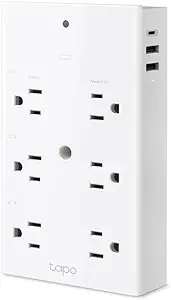
TP-Link Tapo Smart Plug Outlet Extender, Surge Protector, 18W Fast Charging, 3 Smart Outlets, USB-C & USB-A, Night Light, Compatible with Apple HomeKit, Alexa & Google Home
This model stands out for its combination of multiple charging options and broad smart home compatibility. With three smart outlets and three always-on outlets, it offers significant flexibility, especially for users who want both smart control and high-speed charging—something the Anker Power Strip with Surge Protector lacks with fewer outlets. The wide-spaced outlets prevent blocking larger plugs, but this design can feel bulky in tight spaces. Its surge protection and night light add practical value. However, the need for a stable Wi-Fi connection could pose issues in less reliable networks. Compared with the Power Strip Surge Protector Tower, it’s less suited for extensive device loads but excels in compact, smart setups.
Pros:- Versatile 9-in-1 outlet configuration with multiple charging options
- Wide-spaced outlets prevent blocking larger plugs
- Fast charging with 18W USB ports
- Compatible with Apple HomeKit, Alexa, and Google Home
Cons:- Requires stable Wi-Fi for smart features to function reliably
- Design may be bulky for tight spaces
Best for: Tech-savvy homeowners who want flexible, high-speed charging with smart home integration
Not ideal for: Small apartments with limited space or users needing extensive surge protection for high-power devices
- Number of Outlets:3 smart outlets, 3 always-on outlets
- USB Ports:1 USB-C, 2 USB-A
- Wattage:18W fast charging
- Outlet Spacing:1.57 inches
- Compatibility:Apple HomeKit, Alexa, Google Home
- Additional Features:Surge protector, Night light
Our verdict“This pick is ideal for users seeking a compact, versatile smart outlet extender with fast charging and broad platform support.”
Tapo Smart Wi-Fi Power Strip – Matter Compatible, Energy Monitoring, Surge Protection, 6 Outlets & 3 USB Ports
This power strip excels in managing multiple devices via its six individually controlled outlets and three USB ports, making it perfect for users with diverse smart home ecosystems. Its support for Matter, Alexa, Google Assistant, Siri, and Bixby surpasses the Amazon Basics Smart Plug Power Strip, which only works with Alexa, offering broader platform compatibility. The energy monitoring feature helps track power use and reduce bills, but it relies on Wi-Fi, which can be a limitation if your network is unstable. The compact design fits well in cluttered spaces, though the USB ports are limited to 2.4A, which might slow charging for multiple devices. Compared to the Power Strip Surge Protector Tower, it’s less suited for high-power loads but provides smarter control and platform versatility.
Pros:- Supports multiple smart platforms including Matter, Alexa, Google, Siri, and Bixby
- Energy monitoring helps optimize power usage
- Compact, flush-fitting outlets for tight spaces
- Overcharge prevention extends device battery life
Cons:- Dependent on Wi-Fi for remote control
- USB ports limited to 2.4A each, may slow charging
Best for: Homeowners with diverse smart devices needing centralized control and energy monitoring
Not ideal for: People seeking a power strip primarily for high wattage appliances or with limited Wi-Fi reliability
- Number of Outlets:6
- USB Ports:3
- USB Power Output:5V 2.4A
- Surge Protection:Yes
- Compatibility:Matter, Alexa, Google, Siri, Bixby
- Control:Voice, app, local network
Our verdict“This option makes the most sense for users wanting broad smart platform support combined with energy monitoring features.”
Amazon Basics Smart Plug Power Strip with 6 Outlets and 3 USB Ports
This power strip offers a straightforward setup with six individually controlled outlets and three USB ports, making it a practical choice for newcomers to smart home devices. Its hub-free Wi-Fi connection simplifies installation, especially compared with more complex systems like the Geeni Surge Ultra Smart. However, its reliance on 2.4 GHz Wi-Fi limits compatibility with faster networks, and its control is restricted to Alexa, reducing flexibility for users with other platforms. While the USB ports provide basic charging, they lack advanced features like energy monitoring or surge protection beyond simple control. This simplicity makes it less suitable for users wanting comprehensive device management or advanced safety features.
Pros:- Easy, hub-free setup with Alexa app
- Individually controlled outlets for flexible device management
- Includes USB ports for convenient charging
Cons:- Limited to 2.4 GHz Wi-Fi network
- Works only with Alexa, not other smart assistants
Best for: Beginners or casual users seeking easy setup and Alexa control
Not ideal for: Power users or those needing multi-platform support and advanced safety features
- Number of Outlets:6
- USB Ports:3 (2 USB-A, 1 USB-C)
- WiFi:Yes, 2.4 GHz
- Connectivity:No hub required
- Control:Alexa-compatible
- Additional Features:Individually controlled outlets
Our verdict“This is a solid choice for those new to smart power strips who prioritize simplicity and Alexa compatibility.”
Geeni Surge Ultra Smart 8-Outlet Surge Protector, 6 ft. Cord, Black
This surge protector provides ample outlets—eight in total, with six smart and two always-on—making it suitable for extensive setups. Its 1200 joules surge protection offers decent safety for sensitive electronics, but compared to models like the Power Strip Surge Protector Tower with higher joule ratings, it’s less robust for high-power or highly surge-prone environments. The 6-foot cord adds flexibility, and the Wi-Fi, Alexa, and Google Assistant support allow for remote control without a hub. However, with only six smart outlets, it limits smart control over all devices, and the surge protection, while adequate for most uses, may not suffice for very high-end equipment. It’s a good balance for moderate surge protection with smart convenience.
Pros:- Easy smart home integration without a hub
- Remote control via app and voice commands
- Ample reach with 6-foot cord
Cons:- Limited to 1200 joules surge protection
- Only 6 out of 8 outlets are smart-controlled
Best for: Home users wanting a large outlet count with reliable surge protection and simple Wi-Fi control
Not ideal for: Users needing extensive smart control over all outlets or higher surge protection ratings
- Number of outlets:8
- Smart outlets:6
- Always-on outlets:2
- Surge protection:1200 joules
- Cord length:6 ft
- Connectivity:Wi-Fi, Alexa, Google
Our verdict“This surge protector suits users who want a high number of outlets with decent surge protection and quick smart control.”
Power Strip Surge Protector Tower with 16 Outlets and 5 USB Ports (2 USB-C), 10ft Extension Cord, 45° Flat Plug, Charging Station for Home, Office, Dorm Room Essentials
This tower-style power strip excels in providing extensive outlets—16 AC and 5 USB ports—making it suitable for complex setups like offices or dorm rooms. The 10-foot extension cord offers flexible placement, and its safety features protect against overloads and surges. Compared to smaller models like the Anker Power Strip 8-Outlet Surge Protector, it provides a much higher capacity but may feel bulky in smaller spaces. The 45° flat plug helps with tight spaces, but the overall size can be overwhelming for compact desks or bedrooms. While it lacks individual outlet surge protection, its comprehensive safety features make it a reliable, high-capacity charging hub for multiple devices.
Pros:- Massive capacity with 16 outlets and multiple USB ports
- Space-saving tower design organizes cables efficiently
- Safety features include overload protection and lightning protection
Cons:- Bulky size may not fit small spaces
- Limited to 10ft cord, restricting placement options
Best for: Students, office workers, or home users needing extensive outlets and cable organization
Not ideal for: Users with limited space or seeking a lightweight, minimalist power strip
- Number of AC outlets:16
- USB ports:5 (including 2 USB-C)
- Extension cord length:10ft
- Safety features:Overload, short-circuit, lightning protection
- Plug type:45° flat plug
- Maximum output:3.4A
Our verdict“This power strip tower is best suited for environments requiring many outlets and organized cable management, at the expense of size and portability.”
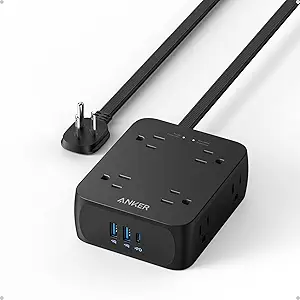
Anker Power Strip with Surge Protector, 8 Outlets, 2 USB-A, 1 USB-C, 5ft Cord
This Anker model stands out for offering a balanced mix of outlets and USB ports in a compact form, making it ideal for small desks or dorm rooms. Compared with the 12-outlet Anker Power Strip with 2100J Surge Protector, it has fewer outlets and slightly less surge protection, but its smaller size and lightweight design make it easier to fit into tight spaces. Its USB-C port is limited to 20W, which may slow charging for high-power devices, and the 5ft cord might restrict placement flexibility. Still, the surge protection of 2000J offers solid device safeguarding for everyday use.
Pros:- Multiple outlets and USB ports cover varied device needs
- High surge protection safeguards electronics
- Compact, lightweight design fits small spaces
Cons:- Limited to 20W USB-C charging, slower for some devices
- Only a 5ft cord, may not reach distant outlets
Best for: Students or home office users needing multiple outlets and USB ports in a limited space
Not ideal for: Power users with high-power devices or requiring longer cords, due to limited USB-C wattage and short cable
- Number of AC outlets:8
- USB-A ports:2
- USB-C ports:1
- Surge protection:2000J
- Cord length:5 ft
- Dimensions:4.5 x 3.6 x 1.6 inches
- Weight:15.3 oz
Our verdict“This power strip is perfect for those who need versatile charging options in a small footprint but don’t require high-watt USB-C charging or long cords.”
Anker Power Strip with 2100J Surge Protector, 12 Outlets, USB-C & USB-A, 5ft Extension Cord
This model excels for users who need maximum outlets and robust safety features. With 12 AC outlets and surge protection up to 2100J, it comfortably outperforms the smaller Anker Power Strip with Surge Protector in capacity and protection. The extra space between outlets accommodates larger plugs, and the inclusion of overload and fire resistance enhances safety. Its 20W USB-C port provides faster charging, a step up from the 20W limit of the previous model. However, the 5ft cord might limit placement options, and it lacks smart or remote control features, making it less suitable for those seeking automation.
Pros:- High surge protection (2100J) for safety
- More outlets for extensive device management
- Extra space between outlets prevents plugging conflicts
- Fast USB-C charging at 20W
Cons:- Limited to 5 ft cord length, may restrict setup
- No smart or remote control features
Best for: Home or office environments where multiple devices and maximum surge protection are priorities
Not ideal for: Users seeking smart control or longer cords for flexible placement
- Number of AC outlets:12
- USB-C port:1
- USB-A ports:2
- Surge protection:2100J
- Extension cord length:5 ft
- Safety features:Surge, fire resistance, overload protection, temperature control
- Warranty:18 months
Our verdict“Ideal for users needing a high-capacity power strip with enhanced safety, but without smart features or longer cords.”
Smart Power Strip with 6 Smart Outlets and 4 USB Ports, 5FT Flat Plug Extension Cord
This smart strip makes a strong case for users who want remote control and automation. Its 6 smart outlets, controllable via the Smart Life app, and 4 USB ports—including USB-C—offer comprehensive management. Compared with the more basic LINKVOLT WiFi Surge Protector, it adds scheduling and energy monitoring, making it suitable for energy-conscious users. However, it only supports 2.4GHz Wi-Fi and requires app setup, which might be inconvenient for less tech-savvy users. The absence of Bluetooth limits local control options, but its compatibility with Alexa and Google Home adds voice command convenience.
Pros:- Remote control and scheduling via app
- Supports multiple appliances with smart outlets
- Compatible with Alexa and Google Home
- Includes multiple USB ports
Cons:- Only supports 2.4GHz Wi-Fi, limiting compatibility
- Requires setup via app, which may be a barrier for some
Best for: Tech-savvy homeowners seeking remote control and scheduling for multiple devices
Not ideal for: Users with unstable Wi-Fi or who prefer simple plug-and-play solutions without app setup
- Number of AC outlets:8 (6 smart, 2 regular)
- USB ports:4 (2 USB-A, 2 USB-C)
- Wi-Fi support:2.4GHz only
- Control:Remote via app, voice control
- Length:5 feet
- Compatibility:Alexa, Google Home
Our verdict“This smart strip is best for users comfortable with app-based control and wanting automation features, but less suitable for Wi-Fi novices.”
LINKVOLT Smart Power Strip WiFi Surge Protector with Alexa & Google Home Voice Control, 3 Outlets, 15A, 1875W, 6ft Cord
The LINKVOLT model offers a simplified yet versatile solution for users who need independent control of multiple devices. Its 3 outlets support up to 1875W and 15A, making it suitable for high-power appliances. Compared with the larger Anker Power Strip with 12 Outlets, it sacrifices capacity for focused control and voice integration. Its 6ft cord provides better reach, but the limited number of outlets might restrict use in setups with many devices. Voice control compatibility with Alexa and Google Home adds convenience, while surge protection helps safeguard electronics. Nonetheless, the need for WiFi and app setup could pose hurdles for some.
Pros:- Supports voice control via Alexa and Google Home
- Independent control of each outlet
- Built-in surge protection
- High power capacity for selected devices
Cons:- Limited to 3 outlets, not suitable for many devices
- Requires WiFi connection and app setup
Best for: Home users who want voice-controlled, independent outlet management for a few high-power devices
Not ideal for: Power users needing multiple outlets or extended cords for complex setups
- Number of outlets:3
- Max power:1875W
- Current:15A
- Connectivity:WiFi 2.4GHz
- Surge protection:1080 Joules
- Cord length:6 ft
Our verdict“This power strip is ideal for those who want voice-controlled, independent management of a few high-power appliances without needing many outlets.”
GHome Smart Power Strip with 6 Outlets & 3 USB Ports, WiFi Surge Protector, Energy Monitoring, Alexa & Google Home Compatible
The GHome model integrates energy monitoring with smart control, making it ideal for users who want to track and optimize power usage. Its 6 outlets and 3 USB ports, including USB-C, support fast charging and device management. Compared with the Smart Power Strip with 6 Smart Outlets, it adds energy monitoring, which appeals to energy-conscious users. It relies on 2.4GHz WiFi and requires app setup, which may be a barrier for some. Its safety protections and fireproof materials add peace of mind, but without Bluetooth or hub options, advanced local control is limited.
Pros:- Supports remote control and voice commands
- Includes energy monitoring for usage insights
- Fast charging with USB-C and USB-A ports
- Safety protections and fireproof design
Cons:- Requires 2.4GHz WiFi and app setup
- Limited to WiFi control without Bluetooth or hubs
Best for: Homeowners or small office users interested in energy savings and remote control
Not ideal for: Power users needing more outlets or a wired hub-based setup for advanced automation
- Number of outlets:6
- USB ports:3 (2 USB-A, 1 USB-C)
- Maximum power:1800W
- WiFi compatibility:2.4GHz only
- Energy monitoring:Yes
- Safety certifications:FCC
Our verdict“Perfect for energy-conscious users seeking remote control with real-time power monitoring, but less suited for extensive device setups.”
Kasa Smart Power Strip KP303 with 3 Outlets and 2 USB Ports
The Kasa Smart Power Strip KP303 stands out for its combination of independent outlet control and USB charging, making it particularly versatile for managing multiple devices simultaneously. Unlike the Anker Power Strip with 6 Outlets, which offers more outlets but lacks smart features, the KP303 emphasizes remote management and voice control, adding convenience for smart home integration. However, its reliance on WiFi and absence of physical buttons mean it might be less suitable for users who prefer tactile controls or have spotty WiFi signals. The surge protection, certified by ETL, provides peace of mind for sensitive electronics. Overall, this pick makes the most sense for those seeking a balanced smart power strip with flexible device control and the convenience of app scheduling.
Pros:- Independently controllable outlets and USB ports for flexible device management
- Supports voice control with Alexa and Google Assistant for hands-free operation
- Remote control and scheduling through the Kasa app enhance automation possibilities
- ETL-certified surge protection shields electronics from power spikes
Cons:- Requires WiFi connection and app setup, which may complicate installation for some users
- No physical control buttons on the device, limiting manual operation
Best for: Smart home enthusiasts who want integrated voice control and remote management for a few high-priority devices
Not ideal for: Users who prefer physical switches or have unreliable WiFi connections, as setup relies on the app and voice commands
- Number of Outlets:3
- USB Ports:2
- Voice Control:Yes, Alexa & Google Assistant
- Surge Protection:Yes, ETL-certified
- Control Method:Kasa Smart app, voice commands
- Setup:WiFi connection via app
Our verdict“This is ideal for users who want a smart, remotely manageable power strip with USB charging and surge protection, despite its reliance on WiFi.”
Anker Power Strip with 300J Surge Protector, 6 Outlets, 2 USB-C, 2 USB-A, 5ft Flat Plug Extension Cord
Compared with the Kasa Smart Power Strip KP303, the Anker Power Strip emphasizes raw charging capacity and physical convenience, with six outlets and four USB ports, including two USB-C for fast device charging. Its flat plug design is a notable advantage, especially in tight spaces such as dorms or under desks, where space is limited. However, it lacks smart features like voice control or app management, making it less suitable for users seeking automation or remote control. The 300 Joule surge protection offers basic safety, but doesn’t match the higher ratings of some premium strips. This pick makes the most sense for those who prioritize physical accessibility and multiple charging options over smart home integration.
Pros:- Multiple outlets and USB ports for extensive device charging
- Flat plug design for easy access in confined spaces
- Reliable surge protection up to 300 Joules ensures basic safety
- Compact dimensions and sturdy build for travel and portability
Cons:- Limited to 240V, which may restrict regional compatibility
- No smart features or remote control capabilities
- Price not specified, potentially less competitive for basic models
Best for: Students or home office users who need reliable, multiple device charging in tight spaces without the complexity of smart features
Not ideal for: Smart home users who want voice control or app scheduling, as this device offers no connectivity features
- Number of Outlets:6
- USB Ports:4 (2 USB-A, 2 USB-C)
- Surge Protection:300 Joules
- Cord Length:5 ft
- Plug Type:Type A
- Voltage:240 volts
- Material:Acrylonitrile Butadiene Styrene, Polycarbonate
Our verdict“This power strip is best suited for users needing straightforward, high-capacity charging with a space-efficient design, rather than smart automation features.”

How We Picked
Our evaluation focused on key factors that matter most when choosing a smart power strip: performance, usability, build quality, and value. We prioritized models with reliable surge protection, strong Wi-Fi connectivity, and broad compatibility with voice assistants and smart home platforms. Ease of setup and operation also played a decisive role, along with the number and versatility of outlets and USB ports. Price was considered relative to features, ensuring we highlight options that offer the best bang for the buck. The ranking reflects a balance between smart features, safety, and affordability, helping readers find options suited to different budgets and tech setups.Factors to Consider When Choosing Smart Power Strips
Choosing the right smart power strip involves considering several factors beyond basic features. Understanding these can help avoid common pitfalls and ensure you pick a model that truly fits your home setup, usage habits, and budget. From compatibility to safety features, each factor influences your experience and long-term satisfaction with your purchase.Compatibility with Smart Home Ecosystems
Most smart power strips now support voice control through platforms like Alexa, Google Home, or Apple HomeKit. Ensuring compatibility with your existing system simplifies setup and allows for more integrated automation. Some models are ecosystem-agnostic or support multiple platforms, which is ideal if you use different voice assistants or plan to expand your smart home gradually. Failing to check this could mean ending up with a device that can’t be controlled via your preferred app or voice command setup, limiting its usefulness.
Surge Protection and Safety Features
Surge protection is essential to safeguard connected devices from voltage spikes, especially during storms or power fluctuations. Look for models with high joule ratings—higher ratings generally mean better protection. Some strips also include features like fire-resistant casing or automatic shutoff if overheating occurs. While these safety features add to the cost, they provide peace of mind for sensitive electronics and valuable appliances, making it a worthwhile investment for long-term durability and safety.
Number and Type of Outlets and USB Ports
The variety and quantity of outlets directly impact how many devices you can connect. Some models emphasize traditional outlets, others focus on USB ports or a mix of both. USB-C ports provide faster charging and better compatibility with newer devices, but they might be fewer in number. Consider your device charging needs—if you have multiple smartphones, tablets, or smart home gadgets, ensure the strip offers enough ports to avoid daisy-chaining or using multiple adapters, which can clutter your space.
Size, Form Factor, and Installation Flexibility
Smart power strips come in various sizes—from compact, wall-mounted designs to larger tower models. Smaller units are easier to place in tight spaces but might have fewer outlets. Tower models often provide more outlets and USB ports but can be bulkier, making placement more challenging. Flat plugs are better for tight spaces behind furniture, while extended cords add flexibility but may clutter your setup. Choosing a size that fits your environment is key to maintaining a clean, functional setup.
Price and Long-Term Value
High-end models with advanced features like energy monitoring, high joule surge ratings, and ecosystem integration tend to cost more upfront. However, they can save money over time by reducing energy waste and protecting costly devices. Budget options might lack some smart functionalities or safety features but can be suitable for less critical applications or for testing smart home integration. Weigh the initial cost against potential benefits and durability to find a model that offers the best long-term value for your needs.
Frequently Asked Questions
Can I control a smart power strip when I’m away from home?
Yes, most smart power strips connect via Wi-Fi or Zigbee, allowing remote control through dedicated apps or voice assistants. This feature is especially useful for turning devices on or off when you’re not physically present, or for automating routines like powering down electronics at night. However, it relies on your home Wi-Fi network being operational and the app being correctly configured, so ensure your network is stable for seamless remote access.
Do smart power strips really save energy?
Many models with energy monitoring features can help identify phantom loads and reduce energy waste by turning devices off when not in use. While they do not automatically save energy without user input or automation, their data can inform smarter usage habits. Combining these strips with automation routines—like scheduling or voice commands—can lead to noticeable energy savings over time, especially for devices that tend to be left on standby.
Are all smart power strips safe to use with high-powered devices?
Not all smart power strips are rated for high wattage or heavy-duty appliances. It’s important to check the maximum load capacity, especially if you plan to connect devices like space heaters or large kitchen appliances. Using a strip beyond its rated capacity can cause overheating or damage. For high-powered equipment, choose models with high joule surge protection and clear wattage specifications to ensure safe operation.
How do I set up and connect a smart power strip?
Setup typically involves plugging in the device, connecting it to your Wi-Fi network via its app, and pairing it with your preferred voice assistant or smart home platform. Most models guide you through step-by-step instructions, which usually take just a few minutes. A stable internet connection and app updates can improve reliability. Reading the manufacturer’s instructions carefully helps avoid setup frustrations or connectivity issues.
Is it worth investing in a premium smart power strip?
Premium models often include features like higher joule ratings, more outlets, advanced energy monitoring, and broader ecosystem compatibility. If you have expensive electronics or want to maximize automation and safety, investing in a higher-end strip can be justified. For casual or occasional use, a more affordable option may suffice. The choice depends on how much you value safety, control, and future-proofing your setup.
Conclusion
For general home use and those new to smart home tech, the Amazon Basics Smart Plug Power Strip offers straightforward control at an accessible price. Tech enthusiasts or those with extensive smart ecosystems should consider the Tapo Smart Wi-Fi Power Strip for its advanced features and compatibility. If safety and premium features are your priority, the Anker Power Strip with 2100J Surge Protector delivers robust protection and reliable performance. Budget-conscious buyers can get solid value with models like the Kasa Smart Power Strip KP303. Ultimately, your choice depends on your specific needs—whether that’s automation, safety, or cost savings—so use this guide to match the right model to your setup.
As an affiliate, we earn on qualifying purchases.Halloween Picks
halloween