Gaming mice with customizable buttons can move frequent commands within easy reach, but the right layout depends on the games you play and how many shortcuts you need. I’d choose the Logitech G502 X Plus as the best overall pick for its versatile button layout and wireless design. The Razer Naga V3 Pro stands out for MMO players who want interchangeable side plates, while the Redragon M908 offers a wired route to a dense grid of programmable controls. The main tradeoffs are button count versus ease of use, wireless flexibility versus wired simplicity, and extra controls versus a comfortable grip. Read on for the full comparison and guidance on matching a mouse to your games.

Get furniture and decor delivered free — and shop member deals
- Fast, free delivery on millions of items
- Access to Prime Big Deal Days deals on October 6–7
- Prime Video, Amazon Music and more included
Complete the kit


Key Takeaways
- The G502 X Plus is the strongest all-rounder: its varied button placement serves a wider mix of games than MMO mice built around dense side grids.
- Side-plate choice separates the Naga V3 Pro: it adapts to different control needs, while the Naga V2 HyperSpeed keeps to a more fixed MMO layout.
- Redragon’s wired MMO models prioritize button quantity: the M908, M901K, and M921 suit players who want many reachable commands and can accept a busier side panel.
- Basilisk models offer a middle ground: their ergonomic layouts add useful shortcuts without asking every player to adopt an MMO-style keypad.
- The G305 is the simplest control setup here: it has fewer programmable inputs than the specialist picks, which can be a benefit for players who want a familiar, compact layout.
| Logitech G502 X Plus Wireless RGB Gaming Mouse – Black |  | Best Overall for Versatile Button Control | Connectivity: LIGHTSPEED wireless | Sensor: HERO 25K | Programmable controls: 13 | VIEW ON AMAZON | See Our Full Breakdown |
| Razer Naga V2 HyperSpeed Wireless MMO Gaming Mouse, Black |  | Best for MMO Macro Control | Programmable buttons: 19 | Connectivity: 2.4 GHz wireless and Bluetooth | Sensor: Focus Pro 30K optical | VIEW ON AMAZON | See Our Full Breakdown |
| Redragon M921 Wired RGB MMO Gaming Mouse |  | Best for Weighted Button Customization | Connectivity: USB wired | Programmable buttons: 18, including 12 side buttons | Sensor: PAW3327 optical | VIEW ON AMAZON | See Our Full Breakdown |
| Redragon M810 PRO Wireless RGB Gaming Mouse, 10000 DPI, Programmable Buttons |  | Best Value Wireless Button Upgrade | Connectivity: 2.4 GHz wireless with nano receiver | Sensor: PAW3325 optical Pixart | Programmable buttons: 8 | VIEW ON AMAZON | See Our Full Breakdown |
| Redragon M908 Wired MMO RGB Gaming Mouse, 12400 DPI, 18 Programmable Buttons |  | Best for Onboard MMO Profiles | Connectivity: Wired USB | Sensor: Pixart PAW3327 optical | Programmable buttons: 18 | VIEW ON AMAZON | See Our Full Breakdown |
| Razer Basilisk V3 Wired Ergonomic Gaming Mouse |  | Best for Scroll-Wheel Control | Connectivity: USB wired | Design: Ergonomic with thumb rest | Programmable buttons: 11 | VIEW ON AMAZON | See Our Full Breakdown |
| Razer Basilisk V3 X HyperSpeed Wireless Gaming Mouse, Black |  | Best Wireless Basilisk | Connectivity: Razer HyperSpeed Wireless and Bluetooth | Battery life: Up to 285 hours on HyperSpeed; up to 535 hours on Bluetooth | Sensor: Razer 5G Advanced 18K Optical | VIEW ON AMAZON | See Our Full Breakdown |
| Redragon M612 Wired RGB Optical Gaming Mouse 8000 DPI with Remapping Keys |  | Best for Claw-Grip Button Remapping | Connectivity: Wired | Design: Ergonomic, claw-grip | Programmable buttons: 11 | VIEW ON AMAZON | See Our Full Breakdown |
| Corsair Nightsword RGB Gaming Mouse for FPS and MOBA – 18,000 DPI, 10 Programmable Buttons, Adjustable Weight System |  | Best for Weight Tuning | Connectivity: Wired | Programmable buttons: 10 | Sensor: Pixart PMW3391 | VIEW ON AMAZON | See Our Full Breakdown |
| Redragon M901K MMO Gaming Mouse, 12,400 DPI, 19 Programmable Buttons, RGB, Black |  | Best for MMO Command Grids | Connectivity: USB wired | Sensor: Optical | DPI: 100–12,400 | VIEW ON AMAZON | See Our Full Breakdown |
| Razer Naga V3 Pro Wireless MMO Gaming Mouse with Swappable Side Plates |  | Best for Switching Between Genres | Side plates: Three swappable magnetic plates with 12, 6, or 2 buttons | Programmable controls: Up to 23 | Sensor: Razer Focus Pro 50K Optical Sensor Gen-3 | VIEW ON AMAZON | See Our Full Breakdown |
| Logitech G305 Lightspeed Wireless Gaming Mouse – Black |  | Best for Simple Wireless Control | Sensor: Logitech HERO | Maximum DPI: 12,000 | Programmable buttons: 6 | VIEW ON AMAZON | See Our Full Breakdown |
| Razer Basilisk V3 Pro Customizable RGB Wireless Gaming Mouse | 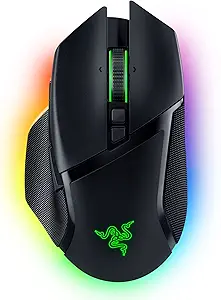 | Best for Ergonomic Customization | Sensor: Razer Focus Pro 30K Optical Sensor | Programmable buttons: 11 | Connectivity: Razer HyperSpeed Wireless, Bluetooth | VIEW ON AMAZON | See Our Full Breakdown |
| Logitech G502 HERO Wired Gaming Mouse |  | Best Wired Button Value | Sensor: Logitech HERO optical sensor | Maximum DPI: 25,600 | Programmable buttons: 11 | VIEW ON AMAZON | See Our Full Breakdown |
| gaming mice with customizable button | Sensor | Connectivity | Programmable buttons |
|---|---|---|---|
| Logitech G502 X Plus Wireless | HERO 25K | LIGHTSPEED wireless | — |
| Razer Naga V2 HyperSpeed Wirel | Focus Pro 30K optical | 2.4 GHz wireless and Bluetooth | 19 |
| Redragon M921 Wired RGB MMO Ga | PAW3327 optical | USB wired | 18, including 12 side buttons |
| Redragon M810 PRO Wireless RGB | PAW3325 optical Pixart | 2.4 GHz wireless with nano receiver | 8 |
| Redragon M908 Wired MMO RGB Ga | Pixart PAW3327 optical | Wired USB | 18 |
| Razer Basilisk V3 Wired Ergono | Focus+ optical sensor | USB wired | 11 |
| Razer Basilisk V3 X HyperSpeed | Razer 5G Advanced 18K Optical | Razer HyperSpeed Wireless and Bluetooth | — |
| Redragon M612 Wired RGB Optica | — | Wired | 11 |
| Corsair Nightsword RGB Gaming | Pixart PMW3391 | Wired | 10 |
| Redragon M901K MMO Gaming Mous | Optical | USB wired | 19 |
| Razer Naga V3 Pro Wireless MMO | Razer Focus Pro 50K Optical Sensor Gen-3 | HyperSpeed Wireless, Bluetooth, USB-C wired | — |
| Logitech G305 Lightspeed Wirel | Logitech HERO | — | 6 |
| Razer Basilisk V3 Pro Customiz | Razer Focus Pro 30K Optical Sensor | Razer HyperSpeed Wireless, Bluetooth | 11 |
| Logitech G502 HERO Wired Gamin | Logitech HERO optical sensor | — | 11 |
More Details on Our Top Picks
Logitech G502 X Plus Wireless RGB Gaming Mouse – Black
The G502 X Plus is my most versatile pick for players who want extra commands without moving to an MMO-style side grid. Its 13 programmable controls include a reversible, removable DPI-shift button, so you can adapt the layout to your grip and game. Compared with the Razer Naga V2 HyperSpeed, it offers fewer buttons for macros but a less specialized shape and a dual-mode scroll wheel for switching between precise steps and fast scrolling. The HERO 25K sensor and LIGHTFORCE switches pair detailed tracking with crisp click actuation, while LIGHTSPEED wireless keeps the setup cable-free. The tradeoffs are its flagship-level cost and the separately sold POWERPLAY charger; players who need a dense MMO command grid may prefer the Naga.
Pros:- 13 programmable controls suit a range of game commands
- Removable, reversible DPI-shift button allows grip-specific layout changes
- Dual-mode scroll wheel supports both tactile scrolling and free spin
- HERO 25K sensor and LIGHTFORCE switches provide precise tracking and crisp clicks
Cons:- POWERPLAY wireless charging system is sold separately
- Fewer programmable buttons than MMO-focused options such as the Razer Naga V2 HyperSpeed
Best for: Players who want a flexible wireless mouse for mixed genres, with enough programmable controls for key commands and macros.
Not ideal for: MMO players who want a large side-button grid, or buyers seeking a wireless charging setup included in the box.
- Connectivity:LIGHTSPEED wireless
- Sensor:HERO 25K
- Programmable controls:13
- Switches:LIGHTFORCE hybrid optical-mechanical
- Scroll wheel:Dual-mode free spin and ratcheting, with tilt
- RGB lighting:LIGHTSYNC with 8 customizable LEDs
- Wireless charging compatibility:POWERPLAY compatible; charging system sold separately
Our verdict“Choose the G502 X Plus if you want adaptable wireless controls and a versatile scroll wheel for several game genres.”
Razer Naga V2 HyperSpeed Wireless MMO Gaming Mouse, Black
When a game demands a command for every ability, the Naga V2 HyperSpeed puts 19 programmable buttons within reach, giving it a clear role beside the more general-purpose Logitech G502 X Plus. Its button count suits MMO rotations and layered macros, while the G502 X Plus is the more adaptable fit for players moving between genres. The Naga also combines 2.4 GHz wireless with Bluetooth, letting buyers choose a low-latency connection for play or Bluetooth for a different setup. Its HyperScroll wheel switches between free spin and tactile modes. The replaceable battery avoids a rechargeable-battery routine, but means keeping spares on hand; stated battery life also differs by connection, reaching up to 250 hours on 2.4 GHz and 400 on Bluetooth.
Pros:- 19 programmable buttons provide room for MMO abilities and macros
- Supports both 2.4 GHz wireless and Bluetooth
- HyperScroll wheel offers free-spin and tactile modes
- Focus Pro 30K sensor supports tracking across surfaces including glass
Cons:- Uses a replaceable battery rather than a rechargeable battery
- Maximum battery life varies by wireless connection mode
Best for: MMO players who want many assignable commands on the mouse and need both 2.4 GHz wireless and Bluetooth.
Not ideal for: Players who prefer a rechargeable mouse or need only a few easy-to-reach extra controls.
- Programmable buttons:19
- Connectivity:2.4 GHz wireless and Bluetooth
- Sensor:Focus Pro 30K optical
- Battery life:Up to 250 hours on 2.4 GHz; up to 400 hours on Bluetooth
- Battery type:Replaceable
- Scroll wheel:HyperScroll with free-spin and tactile modes
- Switches:Gen 2 mechanical, rated up to 60 million clicks
Our verdict“Pick the Naga V2 HyperSpeed if MMO command access matters more to you than a simpler, more general-purpose button layout.”
Redragon M921 Wired RGB MMO Gaming Mouse
The Redragon M921 brings MMO-style command density to a wired setup, with 18 programmable buttons, including 12 on the side and a dedicated fire button. Compared with the similarly button-rich Redragon M908, it has a PAW3327 sensor and five onboard profiles, while its adjustable weight set lets players tune the feel without changing mice. That combination makes it a distinctive choice for right-handed PC players who want both command mapping and weight adjustment. The tradeoffs are the cable and a software-dependent setup process: configuring the controls requires dedicated software. Its 200–12,400 DPI range and polling rate up to 1,000 Hz cover a broad range of play, but the M921 is designed for right-handed use and lists PC compatibility.
Pros:- 18 programmable buttons include 12 side buttons and a dedicated fire button
- Five onboard memory profiles can store different setups
- Eight removable weights allow feel adjustment
- DPI range from 200 to 12,400 and polling up to 1,000 Hz
Cons:- Wired USB connection limits cable-free movement
- Right-handed design excludes left-handed users
- Button customization requires dedicated software
Best for: Right-handed PC MMO players who want many side commands, onboard profiles, and the option to adjust mouse weight.
Not ideal for: Left-handed players, wireless-only setups, or buyers who want to configure controls without dedicated software.
- Connectivity:USB wired
- Programmable buttons:18, including 12 side buttons
- Sensor:PAW3327 optical
- DPI:200–12,400
- Polling rate:Up to 1,000 Hz
- Memory profiles:5 onboard
- Weight tuning:8 weights, 2.4 g each
- Compatibility:PC
Our verdict“Choose the M921 if you want a wired MMO layout with many side commands, stored profiles, and adjustable weight.”
Redragon M810 PRO Wireless RGB Gaming Mouse, 10000 DPI, Programmable Buttons
The M810 PRO is the approachable wireless option here for players who want a handful of mapped actions rather than an MMO command grid. Its 8 programmable buttons, including two side macro buttons and a rapid-fire button, give it more focused control than the 18-button Redragon M908, while 2.4 GHz connectivity removes the cable. Five onboard DPI levels make sensitivity changes straightforward, and its rechargeable battery is stated to last up to 45 hours in eco mode. Compared with the Logitech G502 X Plus, it has fewer controls and a PAW3325 sensor, but its simpler feature set may suit buyers who do not need flagship-level customization. Full button and lighting setup depends on Redragon software, and battery life may drop when RGB is enabled.
Pros:- Eight programmable buttons include side macro and rapid-fire controls
- 2.4 GHz wireless connection avoids a cable during play
- Rechargeable battery is rated for up to 45 hours in eco mode
- Five onboard DPI levels cover common sensitivity changes
Cons:- Full customization requires Redragon Pro software
- Battery life may be shorter with RGB lighting enabled
- Fewer programmable buttons than MMO-focused models such as the Redragon M908
Best for: Players upgrading from a basic mouse who want wireless play, a few macro controls, and rechargeable power.
Not ideal for: MMO players who need a large bank of programmable buttons or buyers who want full customization without software.
- Connectivity:2.4 GHz wireless with nano receiver
- Sensor:PAW3325 optical Pixart
- Programmable buttons:8
- DPI:Up to 10,000; 5 onboard levels
- Polling rate:1,000 Hz
- Battery:Rechargeable; up to 45 hours in eco mode
- Customization software:Redragon Pro driver
Our verdict“The M810 PRO suits players who want wireless convenience and a modest set of mapped controls without an MMO-style button array.”
Redragon M908 Wired MMO RGB Gaming Mouse, 12400 DPI, 18 Programmable Buttons
For players who want MMO commands ready across multiple setups, the Redragon M908 pairs 18 programmable buttons with five memory profiles. That makes it a stronger fit for switching between saved control schemes than the M810 PRO, which has eight buttons and a simpler layout. It also includes an eight-piece weight set and a braided 6-foot cable, so buyers can adjust the feel while keeping a wired connection. The PAW3327 sensor reaches 12,400 DPI, with five adjustable levels and finer software tuning. The compromises follow its specialized design: it is right-handed, weighs 175 g before any weight changes, and its programmable features are listed for Windows; Mac OS support is basic. Choose another option if you need wireless use or a left-handed shape.
Pros:- 18 programmable buttons support MMO commands and macros
- Five memory profiles support saved control setups
- Eight-piece weight set lets buyers adjust the feel
- PAW3327 sensor offers up to 12,400 DPI with fine software tuning
Cons:- Wired-only connection may limit desk movement
- Right-handed design and 175 g weight may not suit every grip
- Programmable features are listed for Windows; Mac OS supports basic use
Best for: Right-handed MMO players on Windows who want a wired mouse with numerous mapped commands and multiple saved profiles.
Not ideal for: Mac users who need programmable controls, left-handed players, or anyone seeking wireless play or a lighter mouse.
- Connectivity:Wired USB
- Sensor:Pixart PAW3327 optical
- Programmable buttons:18
- DPI:Up to 12,400; 5 adjustable levels
- Polling rate:1,000 Hz
- Memory profiles:5
- Weight tuning:8-piece set, 2.4 g each
- Compatibility:Windows programmable; Mac OS basic use
Our verdict“Pick the M908 if you want many programmable MMO controls and saved profiles on a wired Windows setup.”
Razer Basilisk V3 Wired Ergonomic Gaming Mouse
The Basilisk V3 combines 11 programmable buttons with a thumb rest and a dual-mode tilt wheel, giving players shortcuts without the densely packed side grid of the Redragon M901K. Its wheel switches between tactile scrolling and free-spin, which can make browsing long menus or documents quicker while keeping controlled steps available in play. The Focus+ sensor reaches 26,000 DPI, though most buyers choosing this mouse for its buttons will care more about assigning commands than chasing maximum sensitivity. Compared with the wireless Basilisk V3 X HyperSpeed, this wired model adds two programmable controls and the distinctive scroll wheel, but gives up cordless use. The cable suits a fixed desk setup; it is a meaningful limitation for anyone who moves between devices or wants a clear play area.
Pros:- 11 programmable buttons support macros and secondary commands
- Dual-mode tilt wheel offers tactile and free-spin scrolling
- Ergonomic shape includes a thumb rest
- 26,000 DPI Focus+ optical sensor
Cons:- USB wired connection limits movement away from the desk
- Its 11 buttons provide fewer side controls than MMO-focused mice such as the Redragon M901K
Best for: PC players who want an ergonomic mouse with a thumb rest, flexible scroll control, and enough programmable buttons for common game commands.
Not ideal for: Players who need a wireless mouse or want a large MMO-style side grid for many mapped abilities.
- Connectivity:USB wired
- Design:Ergonomic with thumb rest
- Programmable buttons:11
- Scroll wheel:Dual-mode HyperScroll tilt wheel
- Sensor:Focus+ optical sensor
- Maximum sensitivity:26,000 DPI
- RGB lighting zones:11 customizable zones
- Switches:Gen 2 optical switches, rated up to 70 million clicks
Our verdict“Choose the Basilisk V3 if you want programmable controls and a versatile scroll wheel in a wired ergonomic shape.”
Razer Basilisk V3 X HyperSpeed Wireless Gaming Mouse, Black
The Basilisk V3 X HyperSpeed keeps the family’s ergonomic shape and offers 9 customizable buttons, while adding HyperSpeed wireless and Bluetooth. That makes it a stronger fit for players who want programmable commands without a cable across the desk. Its listed battery life reaches up to 535 hours on Bluetooth and up to 285 hours on HyperSpeed, though RGB use and operating conditions can reduce runtime. Compared with the wired Basilisk V3, it has two fewer programmable controls and lacks the dual-mode tilt wheel, so it gives up some convenience in exchange for wireless flexibility. The 18K sensor and mechanical switches cover the core gaming needs, but MMO players who want a dozen side commands may prefer the Redragon M901K.
Pros:- Nine customizable buttons support game commands and macros
- HyperSpeed wireless and Bluetooth provide two connection options
- Listed battery life reaches up to 535 hours on Bluetooth
- Ergonomic shape includes a thumb rest
Cons:- Two fewer programmable controls than the wired Basilisk V3
- RGB lighting can reduce battery life
- Battery runtime varies with connection and usage
Best for: Players who want an ergonomic mouse with programmable buttons and the flexibility to switch between low-latency wireless and Bluetooth.
Not ideal for: MOBA or MMO players who rely on a large side-button grid, or buyers who prefer a rechargeable mouse over battery-powered use.
- Connectivity:Razer HyperSpeed Wireless and Bluetooth
- Battery life:Up to 285 hours on HyperSpeed; up to 535 hours on Bluetooth
- Sensor:Razer 5G Advanced 18K Optical
- Programmable controls:9
- Switches:Gen-2 mechanical, rated for 60 million clicks
- Lighting:Razer Chroma RGB, 16.8 million colors
- Color:Black
Our verdict“Pick this Basilisk if wireless flexibility matters more than the extra controls and scroll-wheel options of the wired V3.”
Redragon M612 Wired RGB Optical Gaming Mouse 8000 DPI with Remapping Keys
The Redragon M612 makes programmable controls the focus with 11 reassignable buttons and a claw-grip shape with textured surfaces. That gives players room to map frequent commands while keeping the button count on par with the wired Razer Basilisk V3. The M612’s sensitivity tops out at 8,000 DPI through software, below the Basilisk V3’s 26,000 DPI ceiling; for buyers prioritizing remapped commands over high sensitivity, that difference may matter less than the grip and layout. Five default DPI levels offer preset changes, while deeper customization requires software. Its wired connection keeps the setup simple but limits mobility, and the five lighting modes may not suit players who want a subdued desk. It is the more straightforward fit for claw-grip users seeking button flexibility.
Pros:- 11 buttons can be reassigned for personalized commands
- Claw-grip ergonomic shape has textured grips
- Sensitivity can be customized up to 8,000 DPI through software
- Five backlight modes offer lighting choices
Cons:- Full DPI customization requires software
- Wired connection restricts movement
- Its 8,000 DPI ceiling is lower than the Razer Basilisk V3’s 26,000 DPI
Best for: Claw-grip players who want a wired mouse with 11 remappable buttons and textured grip surfaces.
Not ideal for: Wireless users or players who want a higher maximum sensitivity and a more feature-rich scroll wheel.
- Connectivity:Wired
- Design:Ergonomic, claw-grip
- Programmable buttons:11
- DPI levels:5 default levels; software customization up to 8,000 DPI
- Backlit modes:5
- Surface coating:Frosted, fingerprint-free
Our verdict“Choose the M612 if claw-grip comfort and remappable buttons matter more to you than wireless use or a high DPI ceiling.”
The Corsair Nightsword is the pick for players who want to tune how a button-rich mouse feels as well as map its 10 programmable buttons. Its adjustable weight system spans 119g to 141g, letting buyers alter the balance and heft for their preferred control. That makes it more configurable in feel than the Redragon M612, which has 11 programmable buttons but no listed weight adjustment. The tradeoff is that the Nightsword is already relatively heavy and can get heavier, so players who favor quick, low-effort movements may be better served by a lighter model. Its 18,000 DPI sensor is below the Basilisk V3’s 26,000 DPI maximum, while its wired connection also rules out cordless play. Complex tuning may be more than casual users need.
Pros:- Ten programmable buttons accommodate macros and game commands
- Adjustable weight system allows balance tuning
- Weight range spans 119g to 141g
- Pixart PMW3391 optical sensor supports up to 18,000 DPI
Cons:- Heavy even at its listed minimum weight, and weight additions increase heft
- Wired connection limits mobility
- Weight and control customization may feel involved for casual users
Best for: FPS and MOBA players who prefer a substantial ergonomic mouse and want to adjust its weight and balance.
Not ideal for: Players who favor lightweight mice, wireless setups, or simple plug-in customization.
- Connectivity:Wired
- Programmable buttons:10
- Sensor:Pixart PMW3391
- Maximum sensitivity:18,000 DPI
- Weight range:119g to 141g
- Design:Ergonomic
Our verdict“Pick the Nightsword if you want to tune a heavier wired mouse around your preferred grip and button assignments.”
The Redragon M901K has the largest control set in this group: 19 programmable buttons, including 12 on the side, plus five memory profiles. That grid gives MMO players a place to map abilities and keep different command setups saved. Compared with the 10-button Corsair Nightsword, it prioritizes a broad menu of reachable commands over weight tuning; eight removable weights let buyers adjust balance, but also add setup work. Its 12,400 DPI maximum is lower than the Razer Basilisk V3’s 26,000 DPI, and the right-handed wired design narrows its fit. Buyers who only need a few extra shortcuts may find the M901K’s side controls excessive. For players who regularly manage many actions, the saved profiles make those controls more useful across different games.
Pros:- 19 programmable buttons, including 12 side buttons
- Five memory profiles save different control setups
- Eight removable 2.4 g weights allow balance adjustment
- Polling rate is adjustable from 125 to 1,000 Hz
Cons:- Right-handed design limits fit for left-handed users
- Wired USB connection restricts movement
- Large side-button grid may overwhelm players who need only a few shortcuts
Best for: Right-handed MMO players who want a large side-button grid and saved profiles for different games or command layouts.
Not ideal for: Left-handed users, wireless buyers, or players who prefer a simple mouse with only a few extra shortcuts.
- Connectivity:USB wired
- Sensor:Optical
- DPI:100–12,400
- Polling rate:125–1,000 Hz
- Programmable buttons:19
- Side buttons:12
- Memory profiles:5
- Weight tuning:Eight removable 2.4 g weights
- Hand orientation:Right-handed
Our verdict“Choose the M901K if your MMO play calls for many mapped commands and profiles in a right-handed wired mouse.”
Razer Naga V3 Pro Wireless MMO Gaming Mouse with Swappable Side Plates
The three magnetic side plates make the Naga V3 Pro the most adaptable pick here: use its 12-button layout for MMO skills, then swap to fewer side buttons for games that need a less crowded grip. It supports up to 23 programmable controls, giving it a broader command surface than the Logitech G305’s six programmable buttons or the Basilisk V3 Pro’s 11. HyperSpeed, Bluetooth, and USB-C offer flexibility across setups, while the stated Bluetooth battery life reaches 280 hours. The tradeoff is size and complexity: its modular controls may be more mouse than casual players need, and full Synapse customization is available on Windows, with limited macOS support. Wireless charging accessories are separate purchases.
Pros:- Three swappable side plates offer 12, 6, or 2-button layouts
- Up to 23 programmable controls suit games with many commands
- HyperSpeed, Bluetooth, and USB-C wired connectivity
- Battery life listed at up to 280 hours on Bluetooth
Cons:- Full Synapse customization is available on Windows; macOS support is limited
- The modular button system can be excessive for casual gaming
- Wireless charging accessories are sold separately
Best for: Players who move between MMO, MOBA, and FPS games and want different side-button layouts for each
Not ideal for: Casual players or macOS users who want a simple mouse with full software customization
- Side plates:Three swappable magnetic plates with 12, 6, or 2 buttons
- Programmable controls:Up to 23
- Sensor:Razer Focus Pro 50K Optical Sensor Gen-3
- Maximum DPI:50,000
- Connectivity:HyperSpeed Wireless, Bluetooth, USB-C wired
- Battery life:Up to 155 hours on HyperSpeed or 280 hours on Bluetooth
- Scroll wheel:HyperScroll Tilt Wheel Gen-2 with Smart-Reel
- Software:Razer Synapse; full features on Windows
Our verdict“Choose the Naga V3 Pro if you want one mouse that can change its button layout for different genres and are comfortable with its added complexity.”
Logitech G305 Lightspeed Wireless Gaming Mouse – Black
The G305 keeps customizable buttons straightforward: its six programmable buttons cover common commands without the dense side grid of the Redragon M908 or the swappable plates on the Razer Naga V3 Pro. That makes it a more approachable fit for players who want a few shortcuts and a compact wireless shape. Logitech’s 1 ms Lightspeed report rate is aimed at responsive play, and the HERO sensor reaches 12,000 DPI. The compromises are practical ones: it uses a replaceable AA battery, and six buttons offer limited room for MMO skill mapping. Compared with the Naga V3 Pro, it gives up extensive reconfiguration in exchange for a simpler, lighter setup.
Pros:- Six programmable buttons cover common game commands
- Lightspeed wireless connection with a 1 ms report rate
- HERO sensor supports up to 12,000 DPI
- Compact design weighs 3.4 oz
Cons:- Requires replacing its AA battery
- Six programmable buttons provide fewer mapping options than MMO-focused mice
Best for: Players who want a compact wireless mouse with a handful of programmable shortcuts for everyday gaming
Not ideal for: MMO players who need a large set of mapped abilities or buyers who prefer rechargeable batteries
- Sensor:Logitech HERO
- Maximum DPI:12,000
- Programmable buttons:6
- Wireless technology:Logitech Lightspeed
- Report rate:1 ms
- Battery life:Up to 250 hours standard; up to 9 months in Endurance mode
- Weight:3.4 oz
- Design:Lightweight, compact wireless
Our verdict“Pick the G305 if a few programmable controls and compact wireless play matter more to you than a large button array.”
Razer Basilisk V3 Pro Customizable RGB Wireless Gaming Mouse
The Basilisk V3 Pro balances 11 programmable buttons with an ergonomic design, making it a middle ground between the G305’s six-button simplicity and the Naga V3 Pro’s genre-specific side plates. Its Focus Pro 30K sensor tracks on various surfaces, including glass according to the product description, while the tilt wheel adds another way to access controls. Thirteen-zone Chroma RGB lighting gives it more visual customization than the G305, though that does not add button capacity. Battery life varies by connection: up to 150 hours on Bluetooth and 110 on wireless. Compared with the wired G502 HERO, this Razer frees you from a cable, but setup is more involved and docking accessories for added features are sold separately.
Pros:- Eleven programmable buttons offer more mapping options than the G305
- Ergonomic design pairs with a tilt wheel for flexible control
- Focus Pro 30K sensor is described as tracking on glass
- Wireless and Bluetooth connectivity with long listed battery life
Cons:- Customization can take more setup than a simpler mouse such as the G305
- Docking accessories for added features are sold separately
- Its 11 buttons provide fewer controls than the Naga V3 Pro’s maximum of 23
Best for: Players who want an ergonomic wireless mouse with a useful set of remappable controls and customizable lighting
Not ideal for: Buyers who want a low-complexity setup, a wired connection, or many MMO-specific side buttons
- Sensor:Razer Focus Pro 30K Optical Sensor
- Programmable buttons:11
- Connectivity:Razer HyperSpeed Wireless, Bluetooth
- Lighting:13-zone Chroma RGB with underglow
- Switches:Razer Optical Switches Gen-3
- Battery life:Up to 150 hours on Bluetooth, 110 hours on wireless, or 32 hours with dock and dongle
- Scroll wheel:Tilt wheel
- Design:Ergonomic
Our verdict“Choose the Basilisk V3 Pro if you want ergonomic wireless control and more programmable buttons than a basic gaming mouse provides.”
Logitech G502 HERO Wired Gaming Mouse
The G502 HERO gives wired players a full set of 11 programmable buttons without asking them to manage a wireless connection or battery. That makes it a practical alternative to the wireless Basilisk V3 Pro: both offer 11 buttons, but the G502 adds adjustable weights and a dual-mode scroll wheel while keeping the connection simple. Its HERO sensor reaches 25,600 DPI, and five removable 3.6 g weights let you change the mouse’s balance. Those options add flexibility, though the cable limits desk movement and the ability to tune weight may be unnecessary for players who want a light, uncomplicated mouse. LIGHTSYNC customization also requires Logitech Gaming Software.
Pros:- Eleven programmable buttons support varied game commands
- Dual-mode scroll wheel offers two scrolling behaviors
- Up to five removable 3.6 g weights allow balance adjustments
- HERO sensor supports up to 25,600 DPI
Cons:- Wired connection restricts movement compared with the wireless Basilisk V3 Pro
- Adjustable weights add complexity and may not suit players who want a light mouse
- LIGHTSYNC customization requires Logitech Gaming Software
Best for: Wired players who want 11 programmable controls, a dual-mode wheel, and adjustable weight
Not ideal for: Players who need wireless freedom or prefer a lightweight mouse without removable weights
- Sensor:Logitech HERO optical sensor
- Maximum DPI:25,600
- Programmable buttons:11
- Connection:Wired
- Scroll wheel:Dual-mode hyper-fast
- Adjustable weights:Up to five 3.6 g weights
- Lighting:Customizable LIGHTSYNC RGB
- Color:Black
Our verdict“Choose the G502 HERO if you want a wired mouse with plentiful programmable buttons and adjustable weight.”

How We Picked
I compared these mice by how well their customizable buttons support different play styles: a few convenient shortcuts for mixed gaming, a broad set of commands for MMOs, or a practical layout for FPS and MOBA play. I also weighed whether button placement appears manageable for a typical gaming grip, whether the connection is wired or wireless, and how much flexibility the design offers. A larger button count alone did not earn a higher position; controls are useful only when a buyer can reach and remember them.
The ranking favors mice that combine accessible controls with versatility, then gives specialist models credit when their layouts serve a clear need. That puts the G502 X Plus first as an adaptable pick, while the Naga V3 Pro ranks highly for its configurable MMO approach. Wired Redragon MMO models stand out for control density, and simpler Logitech or Basilisk options suit buyers who want fewer commands to manage. Buyers should confirm software compatibility and button mapping support for their own setup before choosing.
Factors to Consider When Choosing Gaming Mice With Customizable Buttons
I’d start with the commands you want close at hand, then choose a layout that makes those commands easy to distinguish during play. These broader factors can prevent a high button count or feature list from steering you toward a mouse that does not fit your habits.
Choose a Button Layout Before Counting Buttons
Think about the commands you actually repeat: abilities, weapon changes, push-to-talk, or editing shortcuts. A few side buttons can cover common actions without changing how you hold the mouse. MMO grids make more commands available, but each button needs a reliable mental label and a comfortable reach. A common mistake is choosing the densest layout before considering whether your thumb can distinguish adjacent controls. If your games use a small set of hotkeys, a varied layout like a G502 or Basilisk style may be easier to learn. If you regularly manage many abilities, a dedicated MMO panel may be worth the adjustment period.
Match the Mouse to Your Grip and Hand Movement
Button placement only helps when your hand can reach it without shifting your aim or grip. Compare the shape and side-panel position with how you hold a mouse, especially if you use a fingertip grip or make frequent low-sensitivity arm movements. Large ergonomic shells can feel supportive to some hands and restrictive to others. A heavier or wider mouse may also affect quick repositioning, even when its buttons are well placed. Look for dimensions and shape details from the manufacturer, and check return terms if fit is uncertain. Do not assume a high button count makes a mouse suitable for every hand.
Decide How Much Mapping Flexibility You Need
Programmable buttons can serve different roles: direct keyboard inputs, macros, media controls, or application shortcuts, depending on the mouse software. Before buying, check whether the software supports your operating system and whether profiles can be saved to the mouse or require the app to run. That distinction matters if you switch computers or play on a system where you cannot install software. Interchangeable side plates add physical flexibility, while software remapping changes what existing buttons do. Buyers often focus on the hardware and discover later that their preferred setup depends on an unsupported feature. Verify the exact functions you need rather than treating “programmable” as a guarantee of every mapping option.
Choose Wired or Wireless for Your Setup
Wireless models reduce cable drag and make a cleaner desk, while wired models avoid charging and keep the connection straightforward. A wireless mouse still needs a charging or battery routine, so consider whether that maintenance fits your habits. MMO mice with many controls can also be bulkier than simpler wireless gaming mice, which may matter if you travel with your setup. Wired designs can be a sensible choice for a fixed desk, especially when the button layout is the main priority. Do not pay for wireless convenience if your mouse rarely moves from one station. Conversely, a cable can become an annoyance if it catches during wide movements.
Prioritize Comfort Over Spec-Sheet Numbers
DPI figures and button totals are easy to compare, but they do not tell you whether a mouse feels controlled in your hand. Many players set their sensitivity well below the maximum DPI offered, so a larger number may not change everyday play. Weight adjustment can help tailor a mouse, though it adds another setup choice and does not suit everyone. Consider the wheel, side-button spacing, and overall shape alongside the sensor specifications. A mouse with fewer, clearer controls can be more useful than one with many buttons you rarely press. Choose based on the actions you need and how naturally the mouse supports them.
Plan for Cleaning and Long-Term Use
Side grids, seams, and textured surfaces can collect dust and require more careful cleaning than a simple shell. If you game for long sessions, consider how easy it is to keep the thumb area clean and whether the surface will suit your grip over time. Wireless models add battery care, while wired models remove that task but keep a cable in the setup. Moving parts such as swappable panels add options and make it worth keeping track of accessories. Check warranty terms and the maker’s guidance for cleaning before using liquids or tools around switches. These small ownership details can matter more than a feature you rarely use.
Frequently Asked Questions
How many customizable buttons do I need if I play both FPS and MMO games?
A mixed library usually calls for a flexible layout rather than the largest possible button grid. Start with the commands you use across games, then decide whether MMO abilities justify additional side controls. A mouse with several varied buttons can feel easier to use for aiming-heavy games, while a dense panel may suit sessions built around many hotkeys. Check whether profiles let you assign different mappings by game. If you are unsure, a layout with a moderate number of reachable buttons is a safer starting point than buying solely by count.
Is a mouse with 12 or more side buttons hard to learn?
It can take time, particularly if the buttons are close together or share a similar shape. Learning is easier when the layout gives your thumb clear physical cues and you map controls consistently across games. Begin with a small group of commands you use often, then add more as the placement becomes familiar. Some players benefit from assigning less urgent actions to the harder-to-reach buttons. If you prefer immediate familiarity, a simpler layout may suit you better than a full MMO grid.
Will customizable buttons work in every game?
Support depends on the mouse software, the game, and the input each button sends. Many setups can assign keyboard keys or common actions, but game rules or anti-cheat systems may restrict macros and automation. Check the game’s policies before assigning sequences that perform multiple actions. For broad compatibility, simple one-button mappings to ordinary keys are often the most practical approach. Also confirm that the mouse software runs on your operating system and that you can create separate profiles if you need them.
Should I choose a wired mouse if I want lots of programmable buttons?
Connection type and button layout are separate choices, so a wired connection is not required for a high-control mouse. Wired models can make sense if you want to avoid charging and keep the setup simple. Wireless models can reduce cable drag, but they add battery upkeep and may cost more in exchange for that convenience. Compare the exact layout and software support first, then decide whether the cable or battery routine better fits your desk. For a stationary setup, wired can be a practical choice; for flexible movement, wireless may feel tidier.
Are interchangeable side plates worth choosing over a fixed MMO keypad?
Interchangeable plates make sense if you switch between games that call for different numbers or arrangements of side controls. They can also help you try a simpler layout before committing to a full grid. A fixed MMO keypad may be a better fit if you already know you want many commands available at once and prefer a consistent setup. Consider how often you would actually swap plates and whether you are comfortable storing the unused pieces. Physical flexibility is useful when it matches a real change in your gaming habits.
Conclusion
For one mouse to cover a broad mix of games, I’d choose the Logitech G502 X Plus as the best overall option. The Redragon M908 is my best value style of pick for buyers who want a wired MMO layout with many programmable controls, while the Razer Naga V3 Pro is the best premium fit for players who want adaptable side plates. Beginners may find the Logitech G305 easier to approach because its button layout is simpler. For MMO players who want a dedicated side grid on a wireless mouse, consider the Razer Naga V2 HyperSpeed; for FPS and MOBA players who want useful shortcuts without a keypad, the Corsair Nightsword is a more focused alternative. Match the control layout to the commands you use, and the choice becomes clearer.
Halloween Picks
halloween
As an affiliate, we earn on qualifying purchases.