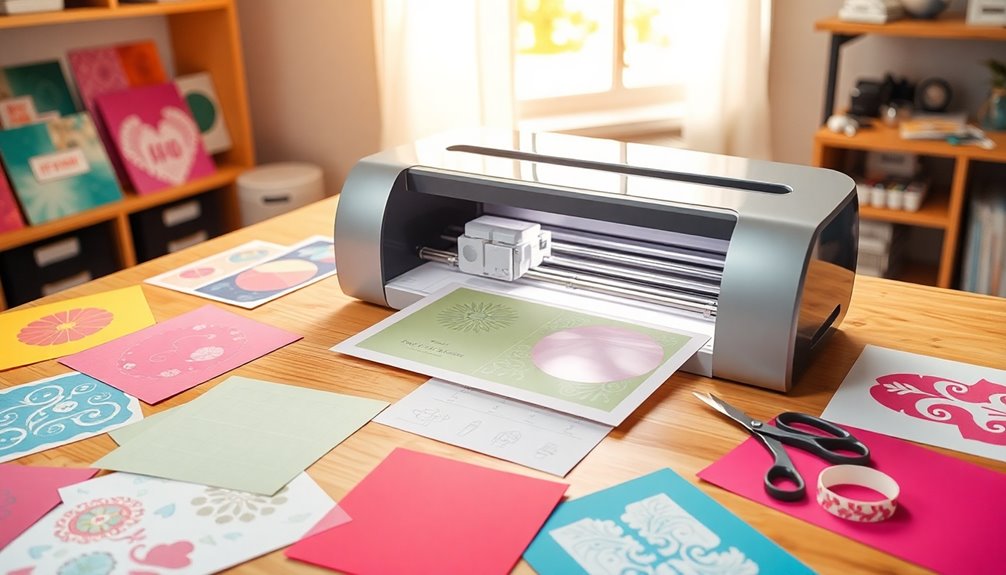

Searching for the best craft cutting machines in 2026? The Cricut Explore 5 stands out as the overall top pick, thanks to its versatility and ease of use. For those looking for a budget-friendly option, the Cricut Joy 2 Essential Bundle offers great value for smaller projects. Meanwhile, the Brother SDX125E provides advanced features for serious crafters. Every machine balances features and price differently, so understanding your project needs and skill level is key. Keep reading for a detailed breakdown of each option to help you find the perfect fit.
Complete the kit


Key Takeaways
- The top picks excel in balancing ease of use with versatile cutting capabilities.
- Price and feature set vary widely, making it essential to match the machine to your craft volume and complexity.
- Bundled options often include extra tools, but may come at a higher price point compared to standalone models.
- Smart technology and AI features are becoming more common, offering advanced automation for experienced users.
- Portability and size are key considerations for crafters with limited workspace or who craft on the go.
| Cricut Joy Xtra – Smart Cutting Machine with Digital Content Bundle | 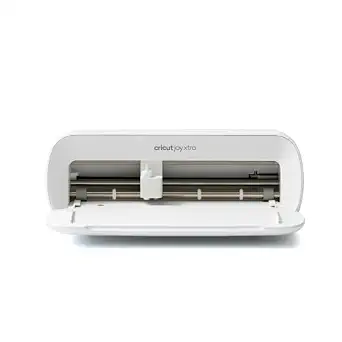 | Best Overall for Versatile Crafting and Full-Color Print-Then-Cut | Includes: Cricut Joy Xtra, Fine-Point Blade, Fine Point Pen, Mini Weeder, Welcome card, USB cable, Power adapter, Free trial Cricut Access, Materials for practice cut, 30 bonus images | Materials Compatibility: Vinyl, iron-on HTV, cardstock, stickers, and more | Features: Cuts, draws, foils, Print-Then-Cut | VIEW ON AMAZON | See Our Full Breakdown |
| Cricut Explore 5 Essential Bundle + Rainbow Sampler |  | Best for Beginners and Hobbyists Looking for Easy Setup and Inspiration | Material Compatibility: Vinyl, heat transfer vinyl, cardstock, printable materials, paper, felt | Cutting Length: Up to 12 feet with Cricut Smart Materials | Connectivity: Bluetooth | VIEW ON AMAZON | See Our Full Breakdown |
| Cricut Joy 2 Essential Bundle + Rainbow Sampler | Smart Cutting Machine with Vinyl, Iron-On, Cardstock, and Printable Vinyl |  | Best Compact and Portable for Quick, Everyday Projects | Weight: 2 lbs (0.91 kg) | Cutting Width: 4.5 inches (11.4 cm) | Materials Compatibility: 75+ including vinyl, iron-on, printable materials, and cardstock | VIEW ON AMAZON | See Our Full Breakdown |
| Liene PixCut S1 Color Sticker Printer & Cutting Machine – All-in-One Sticker Maker for DIY Crafts, Custom Labels & Gifts |  | Best All-in-One for High-Resolution Printing and Precise Die-Cutting | Printer Type: Thermal Dye Sublimation | Resolution: 300 x 300 dpi | Maximum Print Resolution: 300 dpi | VIEW ON AMAZON | See Our Full Breakdown |
| Cricut Joy 2 Essential Bundle + Digital Content, Blue |  | Best for Quick, Colorful Projects with Extensive Digital Content | Cutting Width: 4.5 inches (11.4 cm) | Weight: Just over 2 lbs (0.91 kg) | Materials Compatibility: 75+ including vinyl, iron-on, printable materials, and cardstock | VIEW ON AMAZON | See Our Full Breakdown |
| Cricut Maker 4 Starter Kit for Beginners – Smart Cutting Machine with Vinyl & Iron-On (HTV), Tools & Materials for Stickers, Shirts & DIY Crafts |  | Best for Absolute Beginners Entering Crafting | Included Items: Maker 4 die-cutting machine, cutting mat, blade, tools, vinyl and iron-on sampler sheet, project inspiration | Suitable For: Stickers, shirts, cards, personalized gifts | User Level: Beginner-friendly | VIEW ON AMAZON | See Our Full Breakdown |
| Cricut Explore 5 Essential Bundle + Digital Content, Taupe | 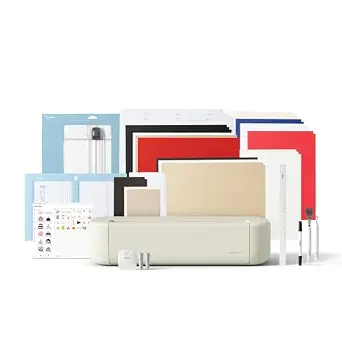 | Best Compact Machine for Wide Range of Materials | Cutting Width: 12 inches (30.5 cm) | Color: Taupe | Compatibility: 100+ materials including vinyl, iron-on, cardstock, printable materials | VIEW ON AMAZON | See Our Full Breakdown |
| Likcut S41 Vinyl Cutter Machine with Print Then Cut and AI Image Generation | 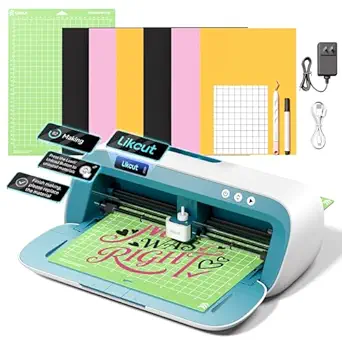 | Best for Tech-Savvy, Feature-Driven Crafting | Cutting Width: 8.5 inches | Connectivity: Wired and wireless | Precision Tolerance: 0.2mm | VIEW ON AMAZON | See Our Full Breakdown |
| Likcut Vinyl Cutter Machine S501 – AI Smart Sticker Maker for Vinyl & Paper Crafts, Portable Plotter for DIY Projects | 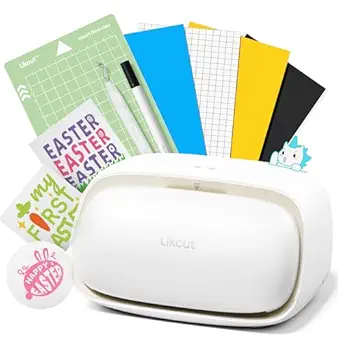 | Best for Speed and Extensive Design Library | Connectivity: Bluetooth 5.0, USB 2.0 | Cutting Speed: Up to 3.2 inches per second | Blade Durability: Cuts over 4,610 meters | VIEW ON AMAZON | See Our Full Breakdown |
| Brother SDX125E ScanNCut Electronic Cutting Machine |  | Best for Custom Design and Versatility | Material Thickness: up to 3mm | Designs Included: 682 | Built-in Patterns: 100 quilting patterns, 9 fonts | VIEW ON AMAZON | See Our Full Breakdown |
| Cricut Joy 2 Deluxe Bundle, Coral |  | Best for Compact Crafting and Quick Projects | Cutting Width: 4.5 inches (11.4 cm) | Weight: Just over 2 lbs (0.91 kg) | Materials Compatibility: 75+ including vinyl, iron-on, printable materials, and cardstock | VIEW ON AMAZON | See Our Full Breakdown |
| Silhouette America Cameo 5 Alpha – Smart Cutting Machine for Print & Cut | 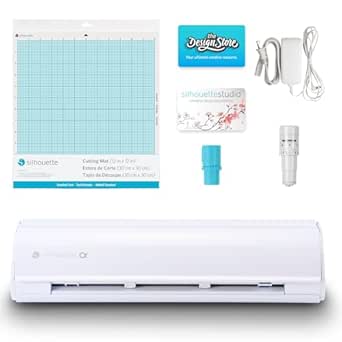 | Best for Precision and Professional-Grade Projects | AutoBlade: Included | Studio Software: Included | Cutting Mat: Included | VIEW ON AMAZON | See Our Full Breakdown |
More Details on Our Top Picks
Cricut Joy Xtra – Smart Cutting Machine with Digital Content Bundle
The Cricut Joy Xtra stands out for its ability to handle over 50 materials, making it a highly adaptable choice for diverse projects. Unlike the Cricut Explore 5, which focuses on straightforward vinyl and paper cuts, the Joy Xtra’s support for foiling and full-color Print-Then-Cut expands creative possibilities. However, this versatility comes with a learning curve, especially for beginners who may find the software and setup initially challenging. The inclusion of a vast digital image library and multiple tools enhances its appeal for seasoned crafters, but the need for a subscription to access the full content can add to costs. This model is best suited for makers who want a flexible, all-in-one device capable of advanced customization without sacrificing ease of use for basic projects.
Pros:- Handles over 50 materials including foil and specialty media
- Includes a large digital library with over 1.5 million images
- Supports full-color Print-Then-Cut for detailed designs
- Compatible with Design Space for easy customization
Cons:- Requires a subscription for full access to content, adding ongoing costs
- Steeper learning curve for newcomers
Best for: Experienced hobbyists and small business owners needing a versatile machine for a wide range of materials and complex designs
Not ideal for: Beginners seeking a simple, straightforward cutter without extra features or subscription costs
- Includes:Cricut Joy Xtra, Fine-Point Blade, Fine Point Pen, Mini Weeder, Welcome card, USB cable, Power adapter, Free trial Cricut Access, Materials for practice cut, 30 bonus images
- Materials Compatibility:Vinyl, iron-on HTV, cardstock, stickers, and more
- Features:Cuts, draws, foils, Print-Then-Cut
- Design Software:Design Space
Our verdict“This machine is ideal for versatile creators who want advanced features but are prepared for a learning curve.”
Cricut Explore 5 Essential Bundle + Rainbow Sampler
The Cricut Explore 5 Essential Bundle makes crafting accessible, especially for those new to digital cutting. Its straightforward Bluetooth connectivity and preloaded content library of over 3,000 images and 100 fonts simplify the creative process, unlike the more complex Cricut Joy Xtra. While it offers up to 12 feet of cutting with Cricut Smart Materials, its compatibility is limited to specific materials and accessories, which could restrict larger or more varied projects. The bundle includes a variety of materials and project ideas, making it perfect for hobbyists or small businesses starting out. However, its higher initial cost and the need for a compatible device with Bluetooth might deter some.
Pros:- Easy to set up and operate for beginners
- Includes a wide variety of materials and project ideas
- Compatible with Cricut Design Space for customization
- Allows up to 12 feet of cutting length with smart materials
Cons:- Limited to compatible materials and accessories
- Requires a Bluetooth-capable device for full functionality
- Initial cost can be high for entry-level users
Best for: Beginners or casual crafters wanting a user-friendly machine with plenty of project inspiration
Not ideal for: Experienced makers seeking advanced features such as foiling or Print-Then-Cut capabilities
- Material Compatibility:Vinyl, heat transfer vinyl, cardstock, printable materials, paper, felt
- Cutting Length:Up to 12 feet with Cricut Smart Materials
- Connectivity:Bluetooth
- Included Materials:Smart Vinyl, Smart Iron-On, cardstock, insert cards, printable vinyl, 6 sheets each of Smart Vinyl and Heat Transfer Vinyl
- Content Library:3,000+ images, 100+ fonts, 1,000+ projects
Our verdict“This pick offers excellent value and ease for newcomers wanting quick results and creative inspiration.”
Cricut Joy 2 Essential Bundle + Rainbow Sampler | Smart Cutting Machine with Vinyl, Iron-On, Cardstock, and Printable Vinyl
The Cricut Joy 2 excels in portability and speed, making it a superb choice for quick tasks like cards, labels, and decals. Its lightweight design (just over 2 lbs) and compact 4.5-inch cutting width set it apart from larger models like the Cricut Explore 5, which can handle longer cuts but is less portable. It works seamlessly with home inkjet printers, enabling full-color sticker creation, unlike many other craft cutters that rely solely on digital design. While its smaller cutting area limits larger projects, it’s perfect for small, frequent tasks and on-the-go crafting. The app-based interface, though user-friendly, might pose a learning curve for some, especially with the need for Bluetooth pairing and additional content purchases.
Pros:- Lightweight and highly portable for on-the-go crafting
- Supports full-color printing via home inkjet printers
- Includes extensive digital content for multiple projects
- Easy to connect via Bluetooth with user-friendly app
Cons:- Limited to a 4.5-inch cutting width, restricting larger projects
- Additional content may be needed for expanded creative options
- Requires Bluetooth and app familiarity
Best for: Crafters who need a portable, quick-to-set-up machine for small projects and labels
Not ideal for: Those requiring large-format cuts or complex multi-layer projects
- Weight:2 lbs (0.91 kg)
- Cutting Width:4.5 inches (11.4 cm)
- Materials Compatibility:75+ including vinyl, iron-on, printable materials, and cardstock
- Included Content:Smart Vinyl, Smart Iron-On, Cardstock, Insert Cards, Printable Vinyl, access to 400+ projects
Our verdict“This machine is best suited for small, quick projects and crafters who value portability over size capacity.”
Liene PixCut S1 Color Sticker Printer & Cutting Machine – All-in-One Sticker Maker for DIY Crafts, Custom Labels & Gifts
The Liene PixCut S1 combines high-resolution printing with precise die-cutting, making it a strong choice for professional-looking stickers and labels. Its all-in-one design saves space and reduces the need for multiple devices, unlike standalone printers or cutters like the Cricut Joy 2. The AI-powered image extraction and 300 dpi print quality deliver vibrant, durable stickers suitable for gifts or branding. However, reliance on app control can be a hurdle for some users, and its limited media tray capacity may restrict batch production. Its weight and size make it less ideal for portability, but its output quality and versatility justify its position for dedicated DIYers and small business owners seeking professional results in a compact form.
Pros:- All-in-one device saves space and time
- High-resolution 300 dpi prints with vibrant colors
- AI-powered image extraction and precise cutting
- Durable, waterproof, scratch-resistant stickers
Cons:- Dependent on app, which may require familiarity and patience
- Limited to one media tray, affecting batch processing
Best for: DIY enthusiasts and small business owners needing high-quality printed and cut stickers in a space-efficient device
Not ideal for: Crafters wanting a simple cutter without integrated printing or those prioritizing portability
- Printer Type:Thermal Dye Sublimation
- Resolution:300 x 300 dpi
- Maximum Print Resolution:300 dpi
- Item Dimensions:11″D x 7.7″W x 4.1″H
- Compatible Devices:Laptops, Smartphones, Tablets
- Control Method:App
Our verdict“Perfect for those who need professional-quality stickers with integrated printing and cutting in a compact setup.”
Cricut Joy 2 Essential Bundle + Digital Content, Blue
The Cricut Joy 2 Essential Bundle offers a compact, colorful solution for fast projects like cards and decals. Its support for full-color printing via inkjet printers sets it apart from many simple cutters, and the bundle includes a variety of tools and digital content for up to 35 projects. Its small cutting width (4.5 inches) limits larger or multi-layer designs, but it excels at creating small, vibrant items quickly. The Bluetooth-enabled app interface simplifies design and operation, although some users might find the initial setup and content purchases somewhat cumbersome. Overall, it’s ideal for users who want an easy-to-use device that provides immediate results with a splash of color.
Pros:- Compact and portable for on-the-go crafting
- Supports full-color printing with home inkjet printers
- Includes digital content for multiple projects
- Easy Bluetooth connection and app control
Cons:- Limited to small cuts, restricting larger projects
- Additional content may be necessary for expanded design options
- Learning curve for digital design and setup
Best for: Casual crafters and small project enthusiasts seeking quick, colorful results with minimal fuss
Not ideal for: Users needing larger-scale cuts or complex multi-layer projects regularly
- Cutting Width:4.5 inches (11.4 cm)
- Weight:Just over 2 lbs (0.91 kg)
- Materials Compatibility:75+ including vinyl, iron-on, printable materials, and cardstock
- Included Content:Smart Vinyl, Smart Iron-On, Value Cardstock, Insert Card Sets, Printable Vinyl, digital images and fonts
Our verdict“This machine delivers quick, colorful projects for casual users who prioritize portability and ease of use.”
Cricut Maker 4 Starter Kit for Beginners – Smart Cutting Machine with Vinyl & Iron-On (HTV), Tools & Materials for Stickers, Shirts & DIY Crafts
The Cricut Maker 4 Starter Kit stands out as the ideal choice for complete newcomers, offering an all-in-one package that simplifies the initial learning curve. Its included tools and materials make it easy to start creating stickers, shirts, and cards without additional purchases, unlike more advanced machines that require separate accessories. While it excels in versatility and ease of use, it’s limited to the included materials for projects beyond basic designs. Compared with the Cricut Explore 5, this kit is more beginner-friendly but less suitable for those wanting to work with a broader range of materials or larger projects. The Maker 4’s intuitive design helps new crafters quickly produce personalized items, though advanced users may find it restrictive for complex tasks.
Pros:- All-in-one starter kit with essential tools and materials
- Easy to use for first-time crafters
- Versatile for various projects like stickers and apparel
Cons:- May require additional materials for more complex projects
- Limited to included materials for initial projects
Best for: Beginners who want a straightforward, all-in-one crafting starter kit for small projects
Not ideal for: Experienced crafters needing advanced features or working with large formats and diverse materials
- Included Items:Maker 4 die-cutting machine, cutting mat, blade, tools, vinyl and iron-on sampler sheet, project inspiration
- Suitable For:Stickers, shirts, cards, personalized gifts
- User Level:Beginner-friendly
- Connectivity:Cricut Design Space
Our verdict“This kit makes the most sense for newcomers seeking a simple, comprehensive entry point into craft cutting.”
Cricut Explore 5 Essential Bundle + Digital Content, Taupe
The Cricut Explore 5 offers a compact, sleek design that balances portability with versatility, making it ideal for crafters who want a machine capable of handling over 100 different materials. Its 12-inch cutting width limits large projects but is perfect for decals, small apparel, and paper crafts. The included bundle provides enough supplies for up to 65 projects, and its compatibility with Cricut Design Space ensures a broad creative scope. Unlike the Cricut Maker 4, which includes more tools, the Explore 5 is more streamlined but requires a Bluetooth connection and the app for operation, which could be a barrier for some. It’s best suited for hobbyists who value space-saving design without sacrificing material compatibility.
Pros:- Compact and sleek design with a user-friendly interface
- Compatible with over 100 materials including vinyl, cardstock, and printable sheets
- Includes a comprehensive bundle for multiple projects
Cons:- Requires Bluetooth and app for operation; no standalone mode
- Limited to 12-inch cutting width
Best for: Craft enthusiasts looking for a compact, versatile machine with a broad material range
Not ideal for: Users needing large-format cutting or those resistant to app-based workflows
- Cutting Width:12 inches (30.5 cm)
- Color:Taupe
- Compatibility:100+ materials including vinyl, iron-on, cardstock, printable materials
- Tools:6 tools including optional Deep Cutting Tool
- Included Content:Smart Vinyl, Smart Iron-On, Value Cardstock, Printable Vinyl, 25 premium images, 1 font
Our verdict“This pick makes the most sense for space-conscious crafters who want a capable machine with extensive material options.”
Likcut S41 Vinyl Cutter Machine with Print Then Cut and AI Image Generation
The Likcut S41 stands out with its advanced features like print-then-cut and AI image generation, making it ideal for crafters seeking high-tech customization. Its real-time status display and support for both wired and wireless connections streamline workflow, while the 8.5-inch width suits small to medium projects. Compared to the Likcut S501, which emphasizes speed and design library size, the S41 offers more precise control suitable for detailed stickers and small decals. Its main tradeoff is a limited material width and a learning curve associated with AI features, which might overwhelm beginners. This machine is best suited for hobbyists with some technical comfort or professionals doing batch small-scale production.
Pros:- Supports print-then-cut and AI design generation
- Real-time status display improves workflow visibility
- Supports both wired and wireless connectivity
Cons:- Limited to 8.5-inch materials, restricting size
- Requires setup and calibration, adding complexity
Best for: Tech-savvy crafters wanting advanced design capabilities and print-then-cut features
Not ideal for: Beginners or those needing to work with larger formats or thicker materials
- Cutting Width:8.5 inches
- Connectivity:Wired and wireless
- Precision Tolerance:0.2mm
- Workflow:3-step process
- Features:Print then cut, AI image generation, real-time status display
Our verdict“This machine suits experienced users aiming for precise, tech-enhanced craft projects in smaller formats.”
Likcut Vinyl Cutter Machine S501 – AI Smart Sticker Maker for Vinyl & Paper Crafts, Portable Plotter for DIY Projects
The Likcut S501 is designed for users who prioritize speed and variety, featuring rapid cutting at up to 3.2 inches per second and access to over 1 million designs. Its AI capabilities, voice commands, and large design library make it appealing for both hobbyists and professionals producing multiple stickers or craft items quickly. Compared with the S41, the S501 offers faster throughput, but with less emphasis on detailed control and smaller project sizes. Its portability and built-in storage add convenience, yet Bluetooth connection dependency might limit true portability. This device is best for those who want a high-volume, design-rich experience with minimal fuss.
Pros:- Fast cutting speeds ideal for batch production
- Extensive library of over 1 million designs and fonts
- Supports voice and text commands for ease of use
- Compact with built-in storage for tools and materials
Cons:- Requires Bluetooth or USB connection, affecting portability
- Limited detailed software info may cause confusion for new users
Best for: DIYers and small business crafters needing fast, extensive design options and ease of use
Not ideal for: Beginners unfamiliar with AI features or those working on large-format projects
- Connectivity:Bluetooth 5.0, USB 2.0
- Cutting Speed:Up to 3.2 inches per second
- Blade Durability:Cuts over 4,610 meters
- Design Library:Over 1 million designs, 1,200+ fonts
- Material Compatibility:Over 50 types
Our verdict“This machine is perfect for fast-paced, design-intensive projects by users comfortable with AI features.”
Brother SDX125E ScanNCut Electronic Cutting Machine
The Brother SDX125E ScanNCut combines scanning with cutting, making it a flexible choice for those who want to turn hand-drawn or printed images into precise cuts. Its built-in scanner and 682 preloaded designs give it a unique edge over purely plotter-based machines like the Likcut S501. The 5-inch touchscreen simplifies project customization, but its limited material thickness capacity of 3mm restricts some thicker craft materials. While its auto blade technology eases adjustments, it requires trial cuts to perfect results. Compared to other machines like the Cricut Explore 5, the SDX125E excels at custom design conversion but isn’t as suitable for large-format or heavy-duty projects. It’s well-suited for detailed, personalized crafts and quilting projects.
Pros:- Built-in scanner for custom design conversion
- Wide variety of included designs and fonts
- Auto blade technology simplifies adjustments
- Touchscreen interface for easy operation
Cons:- Limited to 120V US power supply
- Restricted to 3mm material thickness
- Requires trial cuts for optimal results
Best for: Crafters who want to convert hand-drawn designs into cut files and need a versatile machine
Not ideal for: Users seeking to cut thicker materials or large projects beyond 3mm
- Material Thickness:up to 3mm
- Designs Included:682
- Built-in Patterns:100 quilting patterns, 9 fonts
- Screen Size:5 inches
- Included Accessories:tack mat, pen, spatula, pattern collection, auto blade, sample cardstock
Our verdict“This machine is best for those who prioritize custom design conversion and detailed craft work in smaller formats.”
Cricut Joy 2 Deluxe Bundle, Coral
The Cricut Joy 2 Deluxe Bundle stands out for its portability and ease of use, making it perfect for small-scale projects like cards, labels, and decals. Compared to the Silhouette Cameo 5 Alpha, it offers a more straightforward experience for casual crafters, though it sacrifices some precision and material versatility. Its 4.5-inch cutting width limits larger projects but keeps the machine lightweight and highly portable. The bundle’s inclusion of supplies for up to 55 projects simplifies startup, especially for beginners or hobbyists who prefer a quick, no-fuss setup. However, its reliance on Bluetooth and internet-connected devices can sometimes introduce delays, and the small cutting area isn’t suited for larger or detailed designs. This makes it a solid choice for occasional, small projects, but less ideal for serious or professional use where larger formats and advanced features are needed.
Pros:- Extremely compact and portable, perfect for small spaces
- Supports full-color printing with inkjet printers, expanding creative options
- Includes a comprehensive bundle with supplies for up to 55 projects
- Easy Bluetooth connectivity and user-friendly app
Cons:- Limited to 4.5-inch cutting width, restricting project size
- Requires compatible device and internet connection, which may cause delays
- Additional features and content may require subscription fees
Best for: Beginners or crafters who prioritize portability, ease of use, and small projects
Not ideal for: Users needing large cutting areas or working on complex, detailed designs regularly
- Cutting Width:4.5 inches (11.4 cm)
- Weight:Just over 2 lbs (0.91 kg)
- Materials Compatibility:75+ including vinyl, iron-on, printable materials, and cardstock
- Included Projects:Up to 55
- Connectivity:Bluetooth
- Device Compatibility:iOS, Android, Windows, Mac
Our verdict“This pick makes the most sense for casual crafters and beginners who need a portable, straightforward machine for small projects.”
Silhouette America Cameo 5 Alpha – Smart Cutting Machine for Print & Cut
The Silhouette Cameo 5 Alpha excels in high-precision cutting and versatile media handling, making it ideal for detailed print-and-cut projects on vinyl, paper, and fabric. Its 4-point registration system and fast sketch mode significantly improve workflow efficiency compared to the Cricut Joy 2, especially for complex designs. While the Cricut Explore 5 offers a more beginner-friendly interface, the Cameo 5 Alpha’s advanced features appeal to hobbyists and small business owners who require accuracy and speed. Its maximum material thickness of 3mm keeps it suitable for a variety of materials, though it isn’t designed for thicker or more rigid substrates. The need to install software and the slight learning curve may challenge newcomers, but the quiet operation and precise registration make it a valuable tool for dedicated crafters. This machine is well-suited for users who prioritize professional results over simplicity.
Pros:- High precision with 4-point registration for detailed designs
- Fast sketch mode accelerates creative workflows
- Whisper-quiet operation suitable for shared workspaces
- Compatible with a wide range of materials up to 3mm thick
Cons:- Steeper learning curve, especially for those unfamiliar with software
- Requires software installation and setup, adding to initial complexity
- Limited to materials up to 3mm, restricting thicker or rigid substrates
Best for: Experienced hobbyists or small business owners needing precise print-and-cut capabilities
Not ideal for: Beginners or users seeking a simple, plug-and-play machine for occasional small projects
- AutoBlade:Included
- Studio Software:Included
- Cutting Mat:Included
- Material Compatibility:Vinyl, Paper, Fabric
- Maximum Material Thickness:3mm
- Speed:Up to 400mm/s
Our verdict“This pick makes the most sense for users who need professional-level accuracy and speed for complex print-and-cut projects, and are comfortable with a learning curve.”

How We Picked
The products in this roundup were selected based on a combination of performance, usability, build quality, and value. We prioritized machines that accommodate a variety of materials, from vinyl and paper to fabric and leather, ensuring broad applicability. Ease of setup and operation, especially for beginners, was a key factor, along with the availability of helpful accessories and digital content. We also considered user feedback and expert reviews to identify models that balance advanced features with reliability. The ranking reflects how well each machine meets the needs of different types of crafters, from casual hobbyists to serious makers.Factors to Consider When Choosing Craft Cutting Machines
Choosing the right craft cutting machine involves more than just looking at features and price. It’s important to consider your specific craft projects, skill level, and workspace. Carefully evaluating these factors can help avoid costly mistakes and ensure your machine grows with your craft skills. Here are some critical factors to keep in mind:Compatibility with Materials and Projects
Not all machines can handle every material, from delicate paper to thick leather. Consider what you plan to craft most often and ensure the machine supports those materials. Machines with adjustable blades and settings offer more flexibility, but may come with a steeper learning curve. If your projects are simple, a basic model may suffice; for complex multi-material work, investing in a more advanced cutter pays off in the long run.
Ease of Use and Learning Curve
Some machines are designed with beginners in mind, featuring straightforward interfaces and pre-set options, while others cater to experienced crafters with advanced customization. Think about your comfort level with technology and software. A machine with intuitive controls and a comprehensive tutorial library can help you get started faster, reducing frustration and saving time.
Size, Portability, and Workspace
Space constraints matter when choosing a craft cutter. Compact models like the Cricut Joy are perfect for small spaces or crafting on the go, but may sacrifice some cutting size and features. Larger machines, like the Silhouette Cameo 5, require more dedicated space but support bigger projects. Measure your workspace and consider how portable you need your device to be, especially if you plan to transport it frequently.
Software Compatibility and Digital Content
Most cutting machines come with proprietary design software, but compatibility with other platforms or third-party apps can expand your creative options. Consider whether you need access to a large library of pre-made designs or if you’re comfortable creating your own. Subscription services and bundled digital content can add value, but check if they come with additional costs.
Price and Long-Term Value
Higher-priced models often include advanced features and more robust build quality, but may not be necessary for casual crafters. Conversely, budget options can deliver excellent results for basic projects but might lack durability or versatility over time. Think about your craft ambitions and whether an investment now can support more complex projects later. Sometimes, spending a bit more upfront saves money on upgrades or replacements later.
Frequently Asked Questions
Can I use third-party materials with these machines?
Yes, most craft cutting machines support a variety of third-party materials such as vinyl, paper, and fabric. However, it’s important to check each machine’s compatibility list to avoid damaging the device or ruining your projects. Some models may require specific blade types or settings for certain materials, so reviewing the manual or online guides can help you use non-proprietary supplies effectively.
Are digital design subscriptions necessary to get started?
Not necessarily. Many machines come with free design software and a selection of free designs, which are enough for beginners. Subscriptions or digital content bundles add more variety and convenience, but they are optional. If you’re just starting out, focus on learning the basics with free resources, and consider paid content once you’re ready to expand your creative options.
How important is software compatibility for my craft projects?
Software compatibility is a significant factor because it determines how easily you can upload, customize, and print your designs. Some machines work best with their proprietary software, while others support third-party apps like Sure Cuts A Lot or Adobe Illustrator. If you prefer working across different platforms or want access to a broader design library, ensure the machine’s software options match your workflow.
What’s the typical learning curve for beginners?
Most beginner-friendly models have intuitive interfaces and ready-to-use templates, making initial setup and projects straightforward. While more advanced machines offer greater flexibility, they often require a steeper learning curve and familiarity with design software. For new users, choosing a model with strong support resources and simple controls can reduce frustration and accelerate your crafting journey.
Is size or portability a big concern?
Size and portability depend on your available workspace and whether you plan to craft in multiple locations. Compact models like the Cricut Joy excel in small spaces and transportability but may have limited cutting sizes. Larger models support bigger projects and more complex designs but require dedicated space and are less portable. Evaluate your crafting environment to determine which size fits best.
Conclusion
For casual hobbyists or those with limited space, the Cricut Joy 2 Deluxe Bundle offers a simple, portable solution that still handles many projects well. Serious crafters or those planning larger, more complex work will benefit from the Cricut Explore 5 or Silhouette Cameo 5, which provide expanded capabilities. Beginners will find the Cricut Maker 4 an accessible starting point, while experienced users seeking advanced features might prefer the Likcut S41 or Brother SDX125E. Ultimately, your choice should align with your project scope, skill level, and workspace constraints to ensure a satisfying crafting experience.