TL;DR

Get furniture and decor delivered free with Prime
- Fast, free delivery on millions of items
- Prime Video, Amazon Music and more included
- Member-only deals all year
Home Depot’s Hubspace app lets users control compatible smart-home products from different brands, including lighting, thermostats, outlets and lawn sprinklers. The retailer demonstrated the system in a Charleston condo featured in House Beautiful’s Whole Home project; details such as device compatibility and internet requirements remain relevant to shoppers evaluating the setup.
Home Depot’s Hubspace app can bring controls for compatible smart-home devices into one place, and the retailer demonstrated that capability in a Charleston condo featured in House Beautiful’s Whole Home project. The showcase paired app-connected lighting, fans, doors and locks with an interactive light display, offering visitors a practical example of how the system could be used across a home.
Hubspace is designed to let users manage supported devices through a smartphone app rather than switching between separate controls for each product. House Beautiful’s report says the system works with products bought at Home Depot, including lawn sprinklers, indoor outlets and thermostats, as well as lighting and seasonal items such as Christmas trees. A compatible thermostat, for example, can be controlled remotely through the app.
The app also includes a Vacation Mode, which the report says simulates occupancy while residents are away. That feature is intended to make the home appear lived in; the article does not provide details about how the simulation works, which devices it uses or whether it is a security service.
For the Whole Home project, Home Depot’s role was to connect technology within a luxury condo in downtown Charleston, South Carolina. Designers shaped the interiors, while the company demonstrated how compatible lights, fans, doors and locks could operate through Hubspace. The showcase included “The Color Canopy,” a light installation that used dimming and illumination to evoke the Charleston sky.
One App Across Home Devices
For homeowners, the appeal of a central app is convenience: managing several kinds of household devices in one interface may be simpler than using separate apps or controls. The demonstration also showed how connected devices can serve a design purpose, not just automate routine tasks. In Charleston, adjustable lights became part of an interactive display rather than remaining a behind-the-scenes feature.
The system’s usefulness will depend on which products a household owns and whether they are Hubspace-compatible. The report describes a broad range of product categories, but it does not establish that every device sold by Home Depot—or every product from a listed category—works with the app. Shoppers considering a connected setup will need to check compatibility for each item.
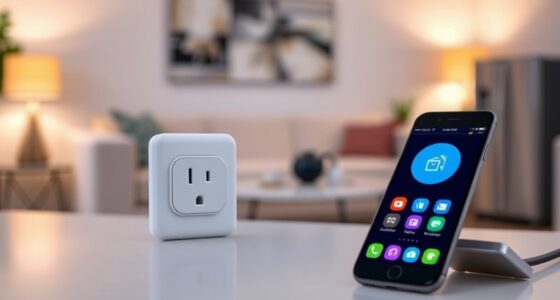
Hubspace compatible smart plugs and indoor outlets
As an affiliate, we earn on qualifying purchases.
As an affiliate, we earn on qualifying purchases.
A Connected Home Showcase
Smart-home apps and connected products are already familiar in areas such as security, climate control and lighting, according to the House Beautiful report. Hubspace’s pitch is to bring compatible products from different brands into a shared control point. The article characterizes this cross-category approach as a distinguishing feature, but does not provide a comparison with other platforms or evidence that Hubspace is the first system to offer it.
The Whole Home project gave Home Depot a setting to show the technology in use. The company hosted a curated pop-up at the Charleston condo, where visitors could see the lighting feature and demonstrations of connected products. The material describes a showcase and product demonstration, not a newly announced launch or a report of a change to the app’s availability.
““The challenge for this year’s Whole Home was simple: transform a luxury condo in downtown Charleston, South Carolina, into a bespoke home filled with design, texture, and personality.””
— House Beautiful’s report, describing the Whole Home design challenge
Compatibility And Setup Details
The supplied report does not specify the app’s full list of supported products, operating-system requirements, connectivity standards, pricing or whether any Hubspace functions require a subscription. It also does not explain whether products from other retailers can be added, how the app handles devices from different manufacturers, or what happens if internet service is interrupted.
The material describes the Vacation Mode feature as simulating occupancy but gives no technical or security details. It does not say whether the feature replaces a monitored alarm system or other security measures; readers should not treat that description as evidence that it does. The report also provides no independent testing, customer data or performance figures for the app.
Check Devices Before Buying
The article does not announce a new release, rollout date or follow-up milestone. For readers interested in using Hubspace, the practical next step is to check the app’s current compatibility information and the product listing for each device before purchase, then confirm that home internet and any required equipment meet the product’s stated requirements. Further details about supported models, setup and feature limits would help clarify how the Charleston demonstration translates to everyday use.
Key Questions
What is Home Depot’s Hubspace?
Hubspace is a smartphone app for controlling compatible smart-home products. House Beautiful’s report describes support for several product categories, including lighting, thermostats, outlets and lawn sprinklers.
Can Hubspace control devices from different brands?
The report says the app can host controls across a variety of branded products bought at Home Depot. It does not provide a complete list of supported brands or device models, so compatibility should be checked for each product.
What does Vacation Mode do?
House Beautiful says Vacation Mode simulates occupancy while a user is away. The article does not explain which devices it controls or describe the feature as a replacement for an alarm or monitored security service.
Where did Home Depot demonstrate Hubspace?
The retailer showed the system in a luxury condo in downtown Charleston, South Carolina, as part of House Beautiful’s Whole Home project. The demonstration included connected products and an interactive lighting feature called “The Color Canopy.”
Source: rss
Halloween Picks
halloween
As an affiliate, we earn on qualifying purchases.