TL;DR

Get furniture and decor delivered free with Prime
- Fast, free delivery on millions of items
- Prime Video, Amazon Music and more included
- Member-only deals all year
Prebuilt AI workstations now often match or beat DIY builds on price due to component shortages and bulk buying. They save time, reduce risk, and come with support, but offer less customization. Your decision hinges on your priorities: control or convenience.
Ever wonder if you should build your own AI workhorse or just buy it ready-made? The answer used to be simple: build for cheaper, buy for quickness. But times have changed. With AI’s explosive growth, component shortages, and manufacturers buying in bulk, the game has shifted. Now, the decision is about more than just dollars—it’s about control, speed, and peace of mind. Whether you’re a hobbyist, a startup, or a research lab, this guide helps you weigh the real trade-offs in 2026.
Get ready for a no-nonsense breakdown. We’ll compare costs, performance, support, and upgradeability—showing you exactly when building makes sense and when buying is smarter. Ready to make that choice with confidence? Let’s go.
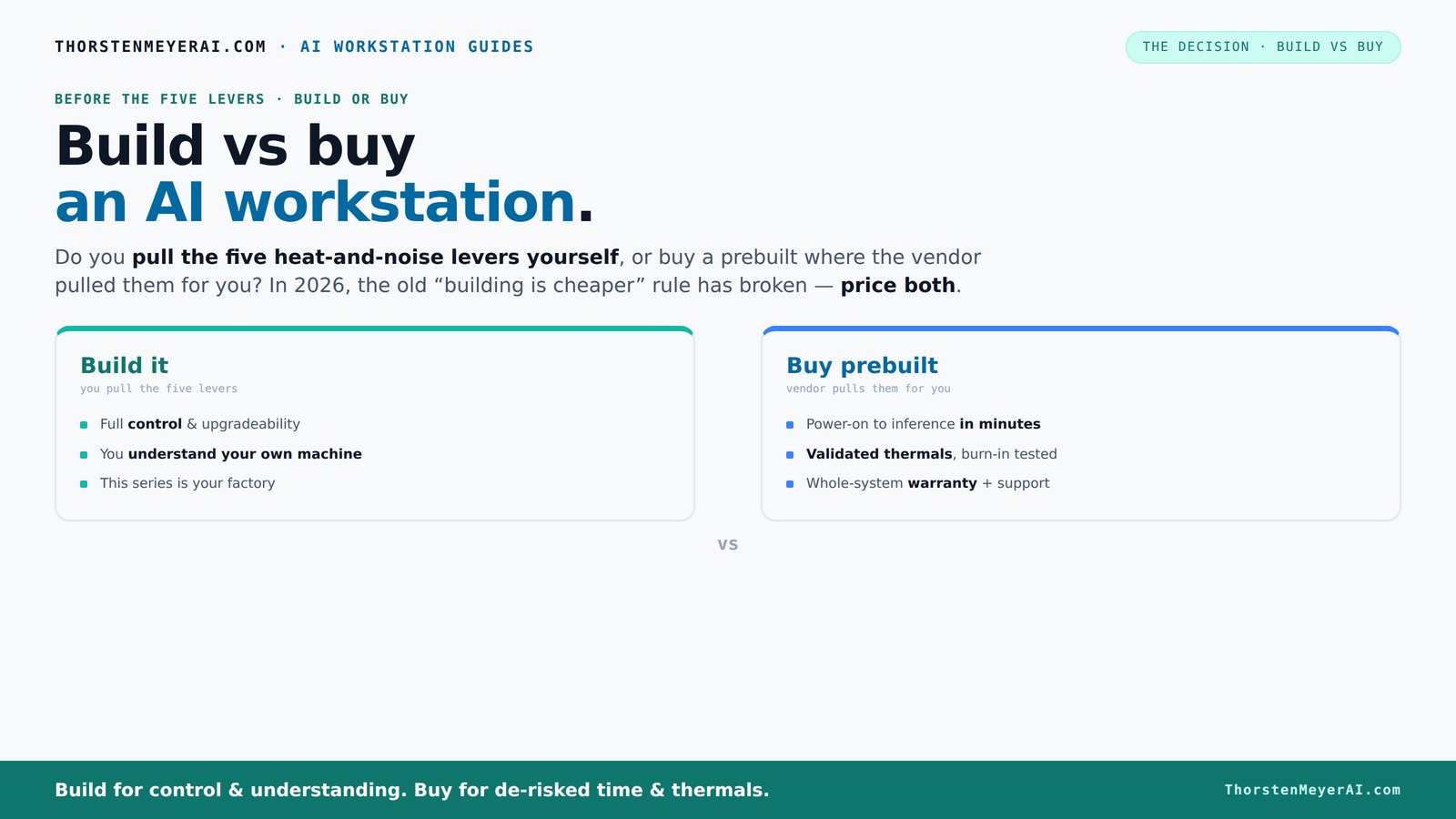
Build vs buy
an AI workstation.
The real question behind this whole series: do you pull the five heat-and-noise levers yourself, or buy a prebuilt where the vendor pulled them for you? And in 2026, the old “building is cheaper” rule has broken. Match your situation in Part 3.
Why the Build vs Buy debate has flipped in 2026
Building your AI workstation used to be cheaper — end of story. But recent supply chain issues and component shortages have turned that around. Prices for GPUs, DDR5 RAM, and SSDs have surged by 20-50% since 2024 making DIY builds more expensive than ever. Meanwhile, OEMs and prebuilt vendors secured bulk discounts early, allowing them to offer systems at prices that often beat DIY in 2026.
For example, a high-end GPU like the NVIDIA RTX 4090 used to be a $1,600 upgrade, but now prebuilt systems often include it for around $2,500, with the vendor handling assembly and thermal tuning. This shift means that the traditional cost advantage of building your own PC is diminishing, especially when you factor in your time, troubleshooting, and the risk of incompatible parts or thermal issues. Learn more about build vs buy options. The implications are significant: for many, the convenience and reliability of prebuilts now outweigh the potential savings of DIY, especially as the complexity of high-performance components increases. This tradeoff influences not only immediate costs but also long-term maintenance and upgrade paths, making prebuilts a more appealing choice for those who prioritize stability and support over absolute customization.
As an affiliate, we earn on qualifying purchases.
How a prebuilt AI workstation saves you time and hassle
Prebuilts are designed for quick deployment. You power them on, install your AI software, and start training or inference in minutes. Discover more about home and tech solutions. Vendors like Lambda or Puget Systems test their rigs for 24–48 hours under load, fine-tuning fans and thermals to prevent throttling. Imagine a machine that’s ready to run at full throttle without you tweaking BIOS or cooling settings.
For instance, if you’re a researcher who needs to start training a model tomorrow, a prebuilt saves a week or more of assembly, testing, and troubleshooting. This time savings isn’t just about convenience; it’s often the difference between meeting a project deadline or missing it. The reliability of pre-validated thermal management and hardware compatibility reduces the risk of unexpected failures or thermal throttling during intensive workloads. This means that users can focus on their core tasks—training models or running inferences—without worrying about hardware stability, which is especially critical in professional or research environments where downtime can be costly. The tradeoff here is that prebuilt systems often come with less room for customization, but for many, the saved time and reduced complexity justify this limitation.
Defining Your Needs: When to Build or Buy
Before diving into costs and technicalities, it's crucial to understand your specific needs. Are you a researcher needing customized hardware for specialized workloads? Or a startup looking for rapid deployment with reliable support? Clarifying your primary goals will help you choose the best option.
If maximum customization and control are your priorities, building your own machine allows you to select each component, optimize for specific AI tasks, and upgrade as needed. Conversely, if you prefer a plug-and-play solution with minimal setup, a prebuilt system offers immediate readiness, reliable performance, and vendor support.
Understanding your workload demands, budget constraints, and long-term upgrade plans will guide you in making the right choice. Explore build vs buy considerations. For example, a research lab with complex, evolving needs might lean towards building, while a startup with tight deadlines might opt for a prebuilt to ensure quick deployment.
Long-Term Considerations: Upgrades and Maintenance
While initial costs and setup are critical, consider the long-term. Building your own AI workstation can offer easier upgrades—simply swap out GPUs, add RAM, or replace storage as needed. However, proprietary cases or connectors in prebuilts can complicate future upgrades, potentially increasing costs or limiting options.
Support and maintenance are also vital. Prebuilts often come with warranties, dedicated support teams, and troubleshooting services, which can save time and reduce stress. Visit SwimFastLane for outdoor tech and lifestyle tips. DIY builds, while flexible, require you to handle hardware issues yourself or find third-party support, which can be time-consuming and sometimes costly.
Balancing these factors depends on your technical comfort level and the importance you place on future scalability. If you expect significant growth or evolving needs, a DIY approach might be more suitable. For stable, predictable workloads, prebuilts offer peace of mind and streamlined support.
Frequently Asked Questions
Is it cheaper to build or buy a prebuilt AI workstation?
In 2026, component shortages and bulk buying often make prebuilts just as affordable or even cheaper than building your own, especially when you factor in time and troubleshooting costs. Always compare prices for your specific configuration before deciding.
Which option offers better performance for AI workloads?
Both can deliver excellent performance, but prebuilts from reputable vendors validate thermals and optimize cooling, often resulting in more reliable sustained workloads. DIY allows for custom tuning, but requires expertise to match that efficiency.
How much can I save by building it myself?
It varies. Skilled builders might save 10-20% on parts, but in 2026, shortages and premiums mean savings are often less than expected. Plus, you trade time and potential troubleshooting for that savings.
Will a prebuilt limit my future upgrades?
It can. Proprietary cases or connectors may restrict GPU, RAM, or cooling upgrades. Always check the vendor’s upgrade support before purchasing a prebuilt.
Are prebuilts good for training, inference, or both?
Reputable prebuilts are designed for sustained workloads, making them suitable for both training and inference. They often include validated cooling that prevents throttling during long runs.
Conclusion
Choosing between building and buying your AI workstation in 2026 boils down to your priorities. Want a machine that’s ready today, backed by reliable support and quick deployment. support? Prebuilt is your friend. Craving control, customization, and learning? Building your own might still be the way to go.
Whatever you choose, remember: the right machine fuels your AI journey. Make it count, and don’t settle for less than what your work deserves.
Halloween Picks
halloween
As an affiliate, we earn on qualifying purchases.